codescan
Data ManagementScan wide-format code variables for pattern matches
Version 4.1.3 | 2026-08-10
codescan scans wide-format diagnosis, procedure, medication, registry, and claims code slots with anchored regex or prefix rules and produces row-level indicators, counts, patient-level summaries, and exports. codescan_describe inventories the codes first so you can draft rules from the data you actually have.
Quick Start
This self-contained example runs after installation and shows inventory, row-level matching, and patient-level output.
clear
input long pid str6 dx1 str6 dx2
1 "E110" "I10"
1 "Z00"  "E119"
2 "I50"  ""
2 "E102" ""
3 "Z00"  ""
end

codescan_describe dx1 dx2
codescan dx1 dx2, define(dm2 "E11" | htn "I1[0-35]")
codescan dx1 dx2, define(dm2 "E11" | htn "I1[0-35]") id(pid) collapse replace
matrix list r(summary)
The first codescan call leaves one indicator per condition on each row; the second reduces the data to one row per pid. r(summary) reports the counts and prevalence for the final analysis unit.
Requirements
- Stata 16 or later
- No external package dependencies
Installation
capture ado uninstall codescan
net install codescan, from("https://raw.githubusercontent.com/tpcopeland/Stata-Tools/main/codescan") replace
Commands
| Command | Description |
|---|---|
codescan |
Scan wide-format code variables and generate indicators, counts, or patient-level summaries |
codescan_describe |
Inspect the raw code inventory before writing scan rules |
How It Works
The usual workflow is to inspect the inventory, draft a small rule set, verify row-level matches, choose the output shape, and then add windows, date summaries, diagnostics, or file outputs.
Variable lists
The words between the command and the comma are a normal Stata varlist. Explicit names work for a few slots, ranges such as dx1-dx30 work for adjacent variables, and wildcards such as dx* select every matching variable.
codescan dx1 dx2 dx3, define(dm2 "E11")
codescan dx1-dx30, define(dm2 "E11")
codescan dx*, define(dm2 "E11")
codescan dx1-dx30 proc1-proc20, define(dm2 "E11" | proc "XF001")
Run separate scans with generate() when diagnosis, procedure, or medication fields need different rule sets and output names.
Matching rules
mode(regex) is the default. Every inclusion and exclusion pattern is anchored at the start of the code, so "E11" matches E110 and E119 but not AE11; character classes and alternation are supported. mode(prefix) treats pipe-separated tokens as simple starts-with prefixes and is useful when regex features are unnecessary.
The unquoted | in define() separates conditions, while a | inside a quoted pattern is part of that regex or prefix list. Use ~ after an inclusion pattern for exclusions, for example define(dm2 "E11" ~ "E116").
Regex patterns that can match without consuming a character are rejected because an anchored empty match would identify every code; empty alternatives in prefix lists are rejected for the same reason. In mode(regex), use . to match any nonempty code rather than .*; in mode(prefix), a period is literal. nocase enables unicode-aware case-insensitive matching, and nodots removes periods from the data before matching without changing the stored data.
Choosing a Workflow
| Goal | Call pattern | Result |
|---|---|---|
| Inspect the raw code distribution | codescan_describe dx1-dx30 |
Top codes and first-character chapter counts |
| Audit rules on encounters | codescan ... without collapse or merge |
Original rows plus condition variables |
| Build one row per patient or entity | codescan ..., id(pid) collapse |
One row per id() |
| Keep encounters and attach patient flags | codescan ..., id(pid) merge |
Original rows plus patient-level results |
| Keep the active data unchanged | Add frame(results) or preserve |
A named result frame or restored data |
| Save the prevalence table | Add export(results.xlsx, replace) |
CSV or Excel summary |
| Save the transformed dataset | Add saving(results.dta, replace) |
The final collapsed or merged result dataset |
frame(name) implies preserve; add replace when the named frame already exists. save() writes reusable rule definitions, whereas saving() writes the transformed result dataset.
Worked Examples
The examples below use this small wide-format dataset. Run the setup before each example that changes the data in memory.
clear
input long pid str6 dx1 str6 dx2 str6 proc1 double visit_dt double index_dt
1 "E110" "I10"  "XF001" 21914 21915
1 "Z00"  "E119" ""      21880 21915
2 "I50"  ""     "JFB10" 21900 21915
2 "E102" ""     ""      22020 21915
3 "Z00"  ""     ""      21910 21915
end
format visit_dt index_dt %td
1. Inspect the inventory
Start with codescan_describe when you do not yet know which code values or first-character chapters occur in the selected slots.
codescan_describe dx1 dx2, top(10)
matrix list r(top_codes)
The command returns the ranked code table in r(top_codes) and the first-character summary in r(chapters).
2. Create row-level indicators
The default regex mode anchors each rule at the start of every selected code value and creates one 0/1 variable per condition.
codescan dx1 dx2, define(dm2 "E11" | htn "I1[0-35]" | chf "I50") replace
3. Collapse within a time window
Use id() and daily Stata dates when the analysis unit is a patient or other entity. alldates requests the first, last, and unique qualifying dates for each condition.
codescan dx1 dx2, id(pid) date(visit_dt) refdate(index_dt) ///
    define(dm2 "E11" | htn "I1[0-35]" | chf "I50") ///
    lookback(365) inclusive collapse alldates replace
4. Match procedure prefixes and avoid name collisions
In prefix mode, pipe-separated tokens are alternative prefixes. generate() keeps a procedure scan separate from other condition variables.
codescan proc1, define(mammo "XF001|XF002" | colectomy "JFB|JFH") ///
    mode(prefix) generate(proc_) replace
5. Exclude specific codes and save reusable rules
Use ~ for exceptions and save() to write the parsed inline definitions to a CSV. The second call reads that CSV as a reusable codefile.
codescan dx1 dx2, define(dm2 "E11" ~ "E116" | htn "I1[0-35]") ///
    save(dm_rules.csv, replace)
codescan dx1 dx2, codefile(dm_rules.csv) replace
The CSV contains name, pattern, exclusion, and label columns. The first call creates the condition variables, so replace permits the codefile call to recreate them.
6. Keep the original data in a frame
Use frame() when the encounter-level data must remain available alongside a collapsed patient-level result.
codescan dx1 dx2, define(dm2 "E11" | htn "I1[0-35]") id(pid) ///
    collapse frame(results) replace
frame results: list
7. Compare hits with positive units
countmode stores the number of matching code slots rather than binary indicators. r(summary) separates those slot hits from the number of observations or IDs with at least one hit.
codescan dx1 dx2, define(dm2 "E11") id(pid) collapse countmode replace
matrix list r(summary)
Add detail allslots in a row-level scan when every matching slot should be credited independently; without allslots, binary detail is attributed to the first matching variable in varlist order.
8. Run sensitivity windows and write deliverables
Several lookback() values require collapse or merge and return prevalence by window plus the denominator behind each window. The Excel export gets a second sheet when cooccurrence is also requested.
codescan dx1 dx2, id(pid) date(visit_dt) refdate(index_dt) ///
    define(dm2 "E11" | htn "I1[0-35]") ///
    lookback(90 365) inclusive collapse cooccurrence replace ///
    export(codescan_results.xlsx, replace) ///
    saving(codescan_results.dta, replace) format(%9.2f)
matrix list r(sensitivity)
matrix list r(sensitivity_n)
Demo
The checkout demo demo/demo_codescan.do creates synthetic administrative data, produces the prevalence chart and Excel workbook below, and can be run from the Stata-Tools repository root, the codescan directory, or codescan/demo/. It optionally uses tc_schemes when already installed and installs the local codescan source into the caller's PLUS directory, so restore your usual codescan installation afterward if needed.
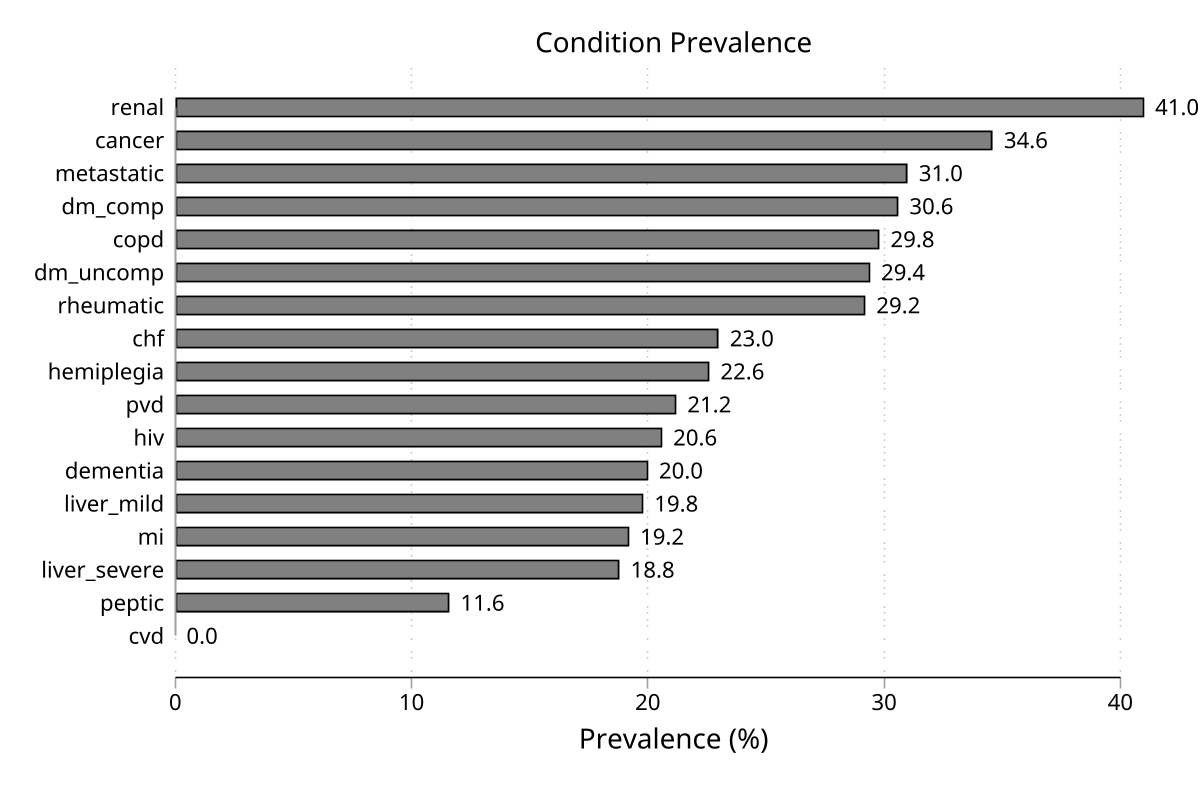
The workbook demo/codescan_results.xlsx contains a summary sheet and a co-occurrence sheet. The image and workbook are regenerated by the named demo script; they are repository checkout assets, not files installed by net install.
Command Reference
codescan
codescan varlist [if] [in], define(string asis) | codefile(string) [options]
Exactly one of define() or codefile() is required. Inline definitions use name "pattern" [~ "exclusion" ...] | name2 "pattern2"; a codefile is a CSV or Stata dataset with string name and pattern columns and optional string exclusion and label columns (column names are case-insensitive). Condition names must be valid, unique Stata names no longer than 26 characters so generated date/count suffixes remain within Stata's name limit.
codescan_describe
codescan_describe varlist [if] [in] [, top(#) nodots tostring save(filename [, replace])]
The command pools nonempty values across all selected variables, excluding the bare . placeholder, reports the most frequent codes, and groups all codes by their first character. Use save() to write a draft CSV with one row per first-character chapter, then edit the names, patterns, exclusions, and labels before using it with codescan, codefile(). When the inventory is empty, save() writes the four-column header with no data rows.
Key Options
Definition source
| Option | Use |
|---|---|
define() |
Supply inline condition definitions separated by an unquoted pipe |
codefile() |
Read string name and pattern definitions from CSV or .dta, with optional exclusion and label columns |
label() |
Add presentation labels using \ between entries; labels do not change condition identifiers |
save() |
With codescan, write define() rules (not codefile()) to .csv; with codescan_describe, write a chapter draft; use the replace suboption to overwrite a file |
Identifiers and windows
| Option | Use |
|---|---|
id() |
Identify patients or entities for collapse and merge |
date() |
Supply a numeric Stata daily event-date variable; required for windows and date summaries |
refdate() |
Supply the numeric daily reference date for lookback() or lookforward() |
lookback() |
Restrict matches to one or more nonnegative backward windows; requires date() and refdate(); multiple windows require collapse or merge |
lookforward() |
Restrict matches to a nonnegative forward window; requires date() and refdate() |
inclusive |
Include refdate() in a single-direction window; with both directions it is already included |
Result dataset
| Option | Use |
|---|---|
collapse |
Reduce the active data to one row per id() |
merge |
Attach patient-level results to the original row structure; fully excluded IDs receive missing values |
earliestdate |
Create <condition>_first variables from qualifying daily dates |
latestdate |
Create <condition>_last variables from qualifying daily dates |
countdate |
Create <condition>_count variables counting unique qualifying dates |
countrows |
Create <condition>_nrows variables counting qualifying rows or slot hits under countmode |
alldates |
Shorthand for earliestdate latestdate countdate |
preserve |
Restore the original data after patient-level processing |
frame() |
Store the final result in a named frame and imply preserve |
saving() |
Save the final collapsed or merged dataset to .dta |
Diagnostics and reporting
| Option | Use |
|---|---|
detail |
Display and return per-variable match contributions in r(varcounts); default attribution is the first matching slot per row |
allslots |
With detail, count every matching slot instead of the first matching variable; requires detail; countmode uses this rule automatically |
cooccurrence |
Return pairwise condition counts in r(cooccurrence) and add a sheet to an Excel export; counts rows or unique IDs according to output shape |
unmatched() |
Create a row-level flag: 1 analyzed and unmatched, 0 analyzed and matched, . not analyzed |
matched_code() |
Create a row-level string containing the first code that survived matching |
graph |
Draw a horizontal prevalence bar chart |
export() |
Write the summary to .csv or .xlsx with an optional replace suboption |
format() |
Set the prevalence display and export format; default is %9.1f |
Matching behavior and naming
| Option | Use |
|---|---|
mode() |
Choose regex (default, anchored and unicode-aware) or prefix |
level() |
Truncate inclusion prefixes to 1–10 characters in mode(prefix); exclusions remain full precision |
nocase |
Use unicode-aware case-insensitive matching |
nodots |
Remove periods from values before matching or tabulating |
tostring |
Scan numeric code variables through temporary strings while leaving the originals unchanged |
countmode |
Store integer code-slot counts instead of binary indicators |
generate() |
Prefix all generated condition and summary variable names |
replace |
Allow overwriting planned output variables or an existing frame() |
noisily |
Display per-condition progress and match totals |
codescan_describe options
| Option | Use |
|---|---|
top() |
Set the number of ranked codes to display; default is top(20) |
nodots |
Remove periods before tabulating, so dotted and undotted values are pooled |
tostring |
Convert numeric code variables temporarily before tabulating |
save() |
Write the chapter summary as a draft CSV codefile |
File options accept ordinary quoted paths with spaces or hyphens, reject unsafe shell/control characters, and never overwrite an existing file without the option-specific replace suboption.
Stored Results
codescan
| Result | Meaning |
|---|---|
r(N) |
Analyzed observations, or unique id() values after collapse or merge |
r(n_conditions) |
Number of conditions |
r(collapsed) |
1 when collapse was used, otherwise 0 |
r(merged) |
1 when merge was used, otherwise 0 |
r(mode_count) |
1 when countmode was used, otherwise 0 |
r(detail_allslots) |
1 when r(varcounts) used all-slot attribution; returned with detail |
r(lookforward) |
Requested forward-window length, when specified |
r(n_excluded_missingdate) |
Rows excluded from a window because date() or refdate() was missing |
r(conditions) |
Condition names in output order |
r(newvars) |
Created variables left in memory on exit |
r(varlist) |
Scanned variables |
r(mode) |
regex or prefix |
r(nocase) |
nocase when case-insensitive matching was used |
r(generate) |
The output prefix supplied to generate() |
r(define) |
The inline definition string, when define() was used |
r(codefile) |
The codefile path, when codefile() was used |
r(id) |
The identifier variable, when specified |
r(date) |
The event-date variable, when specified |
r(lookback) |
The one lookback value as a scalar, or space-separated values as a macro for multiple windows |
r(refdate) |
The reference-date variable when windowing was used |
r(frame) |
The result frame name, when frame() was used |
r(summary) |
Matrix with count, prevalence, total_hits, and positive_units columns |
r(codelist) |
Legacy exact copy of r(summary) |
r(varcounts) |
Per-variable match contributions, with detail; default attribution is first-slot per row, while allslots or countmode credits every slot |
r(cooccurrence) |
Pairwise condition counts, with cooccurrence; rows are counted at row level and unique IDs after collapse or merge |
r(sensitivity) |
Prevalence by condition and lookback window, with multiple windows |
r(sensitivity_n) |
The denominator for each r(sensitivity) column |
Without countmode, total_hits is missing because binary matching does not count repeated slots; count then represents positive_units. With countmode, count and total_hits are slot hits, while positive_units is the number of observations or IDs with at least one hit. r(newvars) is empty after preserve or frame() because the active data are restored.
When detail is requested, r(detail_allslots) records the attribution used for r(varcounts): it is 1 for allslots or countmode, and 0 for default first-slot attribution.
Before publishing a successful result set, codescan clears prior r() contents. A successful call that omits detail therefore does not retain r(detail_allslots) or r(varcounts) from an earlier call; both are absent unless detail is specified.
codescan_describe
| Result | Meaning |
|---|---|
r(n_unique) |
Number of unique nonempty codes, excluding the bare . placeholder |
r(n_entries) |
Number of nonempty, non-. code entries across scanned variables |
r(n_vars) |
Number of variables scanned |
r(varlist) |
Scanned variables |
r(top_codes) |
Matrix with frequency, percent, and cumul_pct columns |
r(chapters) |
Matrix with codes and entries columns grouped by first character |
r(top_code_#) |
Exact code value for each displayed r(top_codes) row; needed when a code is too long for a Stata matrix row name |
The displayed tables, returned matrices, and draft codefile are ordered by descending frequency with alphabetical tie-breaking, so repeated runs over the same data are deterministic. For a code longer than Stata's 32-character matrix row-name limit, r(top_codes) uses a bounded alias; use the matching r(top_code_#) macro to recover the exact code value.
Assumptions and Limits
- The reported prevalence is the prevalence of the supplied code definition, not the prevalence of the underlying disease; positive predictive value and sensitivity of the codes determine the gap between the two.
- Scan variables must be fixed-width strings;
tostringhandles numeric variables through temporary strings, whilestrLvariables are rejected and should be converted first. - Empty strings and the bare
.placeholder are skipped as code values; withnodots, values that become empty after periods are removed are skipped too. date()andrefdate()must be numeric Stata daily dates; datetime variables such as%tcare rejected because windows are measured in days.- Missing
id()values are excluded fromcollapseandmerge, and rows with missing dates are excluded whenever a time window is active. unmatched()andmatched_code()are row-level outputs and are not retained aftercollapse; usemergewhen they must remain with encounter rows.- Rules apply equally to every variable in the varlist; when first-listed diagnosis validity matters, scan positions separately or use distinct
generate()prefixes. - Labels are presentation text only: identifiers in
r(conditions), matrix row names, and the exportconditioncolumn remain the condition names.
Troubleshooting
| Symptom | Likely cause and fix |
|---|---|
not a string variable |
Add tostring or convert the code variable to a fixed-width string |
collapse requires id() |
Supply the patient or entity identifier with id() |
| Window options require dates | Supply numeric daily date() and refdate() variables |
variable ... already exists |
Add replace only when overwriting the planned output is intended |
file already exists or r(602) |
Add the option-specific file suboption, for example export(results.xlsx, replace) |
| A condition matches zero observations | Check spelling, anchoring, dots, case, and whether mode(regex) or mode(prefix) is intended |
Multi-window lookback() fails |
Multiple windows require collapse or merge |
QA
QA suites and how to run them are documented in qa/README.md.
Version History
4.1.3 (2026-08-10)
codescan_describenow restoresvarabbrevand honorssave()when the selected observations contain no codes; the resulting draft CSV contains the documented four-column header and no data rows.saving()with an extension-less filename now applies.dtabefore the overwrite check, so the refusal happens up front instead of afterexport()andgraphhave already written their files.
4.1.2 (2026-08-09)
codescan_describenow handles code values longer than Stata's 32-character matrix row-name limit by using bounded row-name aliases while returning each exact displayed code inr(top_code_#).
4.1.1 (2026-08-05)
- Clears prior
r()contents before publishing a successful call, so an omitteddetailoption cannot leakr(detail_allslots)orr(varcounts); corrected matching, window, saving, codefile, co-occurrence, and stored-result documentation.
4.1.0 (2026-07-25)
- Made
codescan_describeordering deterministic by breaking frequency ties alphabetically, including at thetop()cutoff and in chapter-based draft codefiles. - Corrected
r(detail_allslots)undercountmode, rejected explicit negativelookforward()and zerolevel()inputs, and rejected dotted prefix patterns whennodotswould make them impossible to match. - Widened
matched_code()to the widest scanned fixed string up tostr2045, rejected repeated lookback windows, and added a note when row-level outputs are discarded bycollapse.
4.0.1 (2026-07-18)
- Fixed
saving()undermergeso internal temporary variables are not written, made the Mata engine reload aftermata clear, rejected case-variant duplicate names, and added a clear guard for datetime window variables.
4.0.0 (2026-07-17)
- Removed confidence intervals from the console, matrices, and exports; prevalence and the other stored results were unchanged apart from the removed CI fields.
3.0.0 (2026-07-17)
- Added transactional output handling, three-state
unmatched(), richer labels and exports,allslots, andcountmode; malformed or empty-matching regex rules now error instead of producing silent cohorts.
2.0.0 (2026-06-19)
- Removed the former comorbidity-scoring features;
codescanis now a pure wide-format code-field scanner.
Author
Timothy P Copeland, Karolinska Institutet
License
MIT