datamap
Data ManagementPrivacy-safe dataset documentation and Markdown data dictionaries
Version 1.6.6 | 2026-08-11
datamap automatically classifies variables and creates privacy-aware aggregate dataset maps in text or JSON. datadict, datacheck, and datamvp extend the workflow with Markdown dictionaries, console QC gates, and missing-value pattern analysis.
Quick Start
This self-contained example runs after installation and writes a privacy-safe text map for Stata's example data.
sysuse auto, clear
datamap, output(auto_map.txt)
Requirements
- Stata 16 or later
- No external package dependencies for the four commands
- Pandoc is optional and is needed only when converting a
datadictMarkdown file to HTML, PDF, or Word
The repository demo uses the sibling logdoc and tc_schemes packages to regenerate console transcripts and the gallery graph. It installs them from the checkout when available and otherwise uses their public Stata-Tools sources.
Installation
capture ado uninstall datamap
net install datamap, from("https://raw.githubusercontent.com/tpcopeland/Stata-Tools/main/datamap") replace
Commands
| Command | Purpose |
|---|---|
datamap |
Create aggregate text or JSON documentation for one dataset or a collection of .dta files |
datadict |
Create a Markdown data dictionary with optional metadata, missingness, statistics, and separate-file output |
datacheck |
Profile data in the console and enforce declared expectations or schema comparisons |
datamvp |
Tabulate missing-value patterns, test monotone missingness, and draw missingness graphs |
How It Works
datamap, datadict, and datacheck use the same classifier. It applies exclude() first, then explicit continuous(), categorical(), and date overrides, followed by string type, date formats, value labels or low cardinality, and continuous fallback; config() can supply reusable settings.
The default input is the dataset in memory. single() reads one .dta file, directory() scans .dta files, and filelist() reads a named list of files; add recursive for nested directories. datadict also accepts a line-delimited manifest() and can use a varlist only with in-memory data or single() input.
datamap writes text by default and switches to JSON with format(json). datadict writes Markdown. separate creates one output per input dataset, while saving() writes the variable-level metadata table used by downstream checks or other project tooling.
datamap and datadict aggregate values by default. datamap's samples() option deliberately adds row-level sample values; use exclude() and datesafe when those rows must not expose identifiers or date values. mincell(5) is the default small-cell threshold for categorical and binary frequencies, and uniqcap(1000) is the default cap for distinct-value counts.
On successful in-memory runs, datamap and datadict leave the caller's observations, variables, sort order, labels, characteristics, and data signature unchanged. File-based routes preserve and restore the caller's data; datacheck always restores it, and datamvp is sortpreserve.
Choosing a Workflow
| Goal | Command | Result |
|---|---|---|
| Build a technical inventory for a handoff or pipeline | datamap |
Privacy-aware text or JSON map with classifications, summaries, and optional samples |
| Publish a readable variable reference | datadict |
CommonMark Markdown with optional metadata, missingness, statistics, and notes |
| Inspect or gate a dataset before analysis | datacheck |
Console profile, expectation verdict, and optional profile or violation artifact |
| Understand joint missingness | datamvp |
Pattern-frequency table, monotone test, generated indicators, or graph |
Start with one dataset and the default output. Add exclude() and datesafe before sharing a map, then move to directory() plus recursive for nested collections; for datadict, use manifest() when the single-dataset contract is settled.
Worked Examples
The examples use only Stata's built-in auto data and temporary files created by the examples. Run each example independently unless it explicitly carries state forward.
1. Write an aggregate text map
sysuse auto, clear
datamap, output(auto_map.txt) quality missing(detail)
The output contains variable classes, aggregate summaries, value labels, missingness, and quality guidance without exporting sample rows.
2. Apply privacy controls and automatic structure detection
sysuse auto, clear
datamap, output(auto_private.txt) exclude(make) compact autodetect quality
compact keeps the disclosure summary and quick-reference content while omitting the longer guidance sections.
3. Produce JSON and save the metadata table
sysuse auto, clear
datamap, format(json) output(auto_map.json) saving(auto_metadata.dta, replace)
The JSON is suitable for programmatic consumers, and auto_metadata.dta contains one row per documented variable plus the shared classification and privacy fields.
4. Create a Markdown dictionary with statistics
sysuse auto, clear
datadict, output(auto_dictionary.md) title("Auto data dictionary") missing stats detail datasignature
Use columns() when the default dictionary columns should be replaced or reordered, and use notes() or changelog() for document-level content.
5. Document a saved dataset without changing the active data
sysuse auto, clear
quietly datasignature
local before "`r(datasignature)'"
tempfile auto_file
local auto_file "`auto_file'.dta"
save "`auto_file'", replace
datadict, single("`auto_file'") output(auto_from_file.md) missing stats
quietly datasignature
assert "`before'" == "`r(datasignature)'"
The single() route loads the file for processing and restores the caller's in-memory data afterward.
6. Build separate dictionaries from a temporary directory
tempfile marker
local inputs "`marker'_inputs"
local outputs "`marker'_outputs"
mkdir "`inputs'"
mkdir "`outputs'"

sysuse auto, clear
save "`inputs'/auto_original.dta", replace
replace mpg = mpg + 1
save "`inputs'/auto_changed.dta", replace

datadict, directory("`inputs'") recursive separate outdir("`outputs'") suffix("_dictionary")
outdir() must already exist. The command writes one Markdown file per dataset with the requested suffix.
7. Profile data and enforce expectations
sysuse auto, clear
datacheck price mpg weight, detail outliers(3)
datacheck, expectn(74) isid(make) notmissing(price mpg weight) inrange(mpg 10 50)
Gate failures exit with return code 9; add warn when violations should be reported without stopping the do-file.
8. Save a profile and compare a refreshed dataset
sysuse auto, clear
tempfile baseline violations
local baseline "`baseline'.dta"
local violations "`violations'.dta"
datacheck, saving("`baseline'", replace)
generate byte readme_added = 1
datacheck, compare("`baseline'") violations("`violations'", replace) warn
compare() reports added, dropped, type-changed, and class-changed variables; violations() can save a structured .dta artifact or write to a frame.
9. Inspect missingness patterns and draw a graph
sysuse auto, clear
datamvp price mpg rep78, percent sort monotone
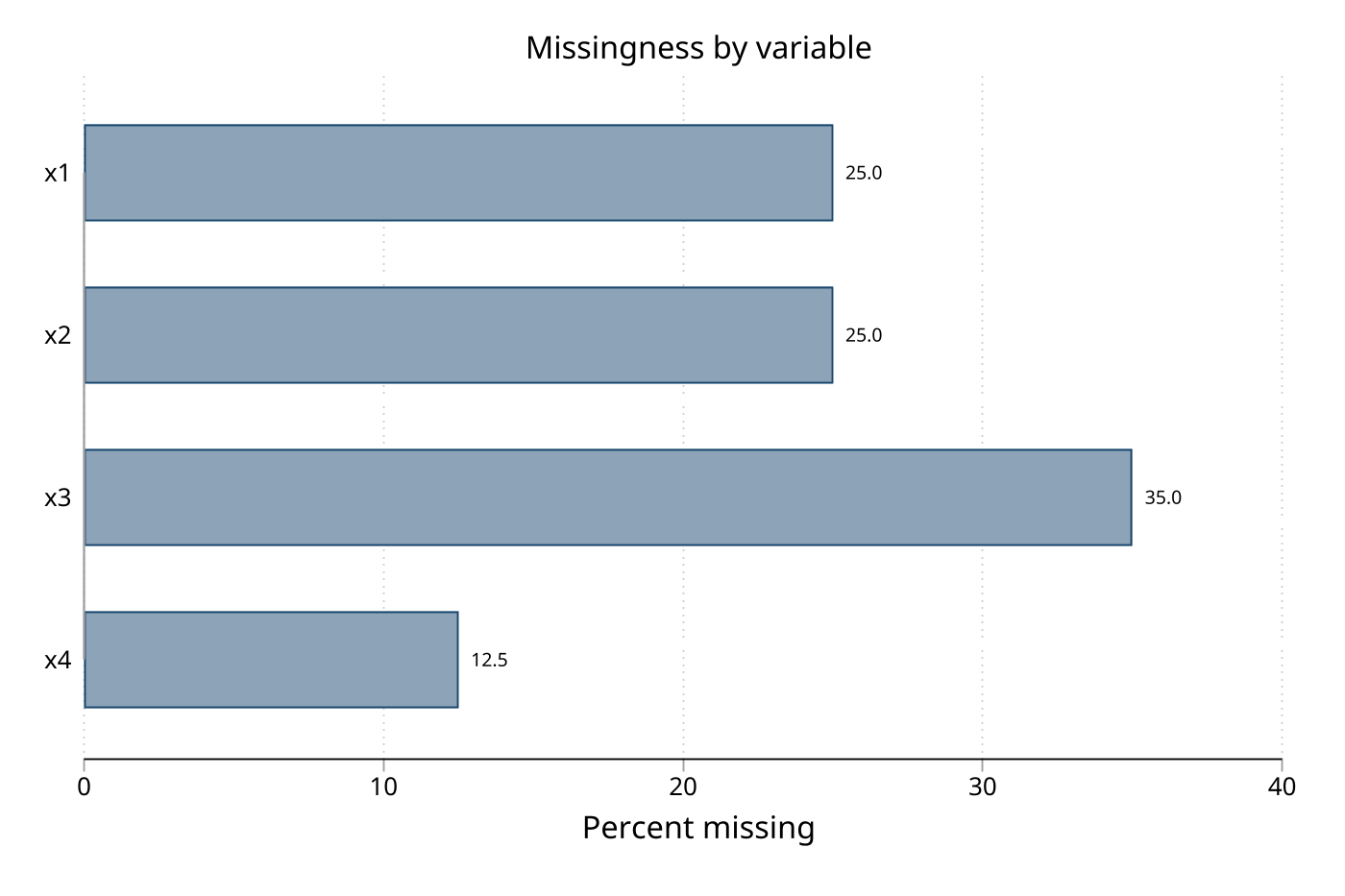
datamvp price mpg rep78, graph(bar) gname(auto_missing)
graph export auto_missing.png, as(png) replace
datamvp treats empty strings as missing, returns pattern counts and monotone status, and supports generate() or save() when the pattern data should be reused.
Demo
From a Stata-Tools repository checkout, run the named demo script from the repository root:
stata-mp -b do datamap/demo/demo_datamap.do
The script installs the local datamap source plus logdoc and tc_schemes from the checkout or their public Stata-Tools sources, writes reproducible assets under datamap/demo/, and removes its temporary logs at the end. The generated assets are checkout documentation, not files installed by net install.
- Privacy-safe map transcript
- JSON output transcript
- Markdown dictionary transcript
- Console QC transcript
- Missingness-pattern transcript
- Generated JSON metadata
- Clinical Markdown dictionary
Command Reference
datamap
datamap [, options]
See datamap.sthlp for the full syntax, classification rules, output schema, privacy warnings, and examples.
datadict
datadict [varlist] [, options]
See datadict.sthlp for Markdown column contracts, manifests, metadata, conversion, and separate-output workflows.
datacheck
datacheck [varlist] [if] [in] [, options]
See datacheck.sthlp for profile fields, gate syntax, reusable .dta check specifications, comparison artifacts, and return codes.
datamvp
datamvp [varlist] [if] [in] [, options]
See datamvp.sthlp for pattern filters, monotone tests, generated indicators, graph options, and saved results.
Key Options
datamap
| Options | Purpose |
|---|---|
single(), directory(), filelist(), recursive |
Input routes and nested-directory scanning. |
output(), format(text), format(json), separate, append, saving(), config() |
Output format, routing, metadata, and reusable settings. |
nostats, nofreq, nolabels, maxfreq(25), maxcat(25), mincell(5), uniqcap(1000), compact, noguidance |
Summary detail, thresholds, and report length. |
exclude(), continuous(), categorical(), date(), dateformat(), detect(), autodetect, panelid(), survivalvars() |
Privacy exclusions, classification overrides, and structure detection. |
datesafe, samples(), missing(detail/pattern), quality, quality2(strict) |
Sample-row privacy, missingness, and quality diagnostics. |
format(text) is the default and uses datamap.txt when output() is omitted; JSON uses datamap.json. append is available for combined text output, not JSON.
datadict
| Options | Purpose |
|---|---|
single(), directory(), filelist(), manifest(), recursive |
Input routes and nested-directory scanning. |
output(), separate, outdir(), suffix(_dictionary), saving(), config() |
Output routing, metadata, and reusable settings. |
title(), subtitle(), version(), author(), date(), notes(), changelog() |
Document metadata and explanatory sections. |
missing, stats, detail, columns(), datasignature |
Dictionary content and technical metadata. |
exclude(), continuous(), categorical(), datevars(), dateformat() |
Privacy exclusions and classification overrides. |
maxcat(25), maxfreq(25), mincell(5), uniqcap(1000) |
Category, frequency, suppression, and distinct-count thresholds. |
The default output is data_dictionary.md. date() sets document metadata, while datevars() overrides which variables are classified as dates.
datacheck
| Options | Purpose |
|---|---|
single(), id(), exclude(), continuous(), categorical(), date(), detail, maxfreq(20), rare(), outliers(0), mincell(0), maskrare |
Profile variables, distributions, rare cells, and outliers. |
nomissing, patterns |
Missingness summaries and pattern analysis. |
expectn(), isid(), nodups, require(), notmissing(), inrange(), allowed(), forbid(), regex(), notvalues(), warn, gatesonly, onlyflagged, show(flagged) |
Expectations, gates, display filters, and halting behavior. |
by(), over(), checks(), makespec(), compare(), saving(), violations(), config() |
Grouped checks, reusable specs, comparisons, artifacts, and settings. |
rare() flags low-frequency levels, outliers(#) uses an IQR rule, and maskrare masks cells below the effective rare/minimum-cell threshold. Gate failures exit with return code 9 unless warn is used.
datamvp
| Options | Purpose |
|---|---|
minfreq(1), notable, skip, sort, nodrop, percent, cumulative, ascending, minmissing(), maxmissing(), nosummary, wide |
Pattern table filters, ordering, and display. |
correlate, monotone, generate(), save() |
Missingness analysis and reusable outputs. |
| `graph(bar | patterns |
The default graph orientation for graph(bar) is horizontal. matrix graphs automatically sample up to 500 observations when the dataset is larger and accept only the documented sample(#) and sort suboptions. The command accepts at most 244 variables. generate() checks every output name before creating variables and refuses to overwrite existing targets.
Stored Results
The help files document the complete stored-result contracts. The following tables list the results most useful in a pipeline.
datamap
| Result | Meaning |
|---|---|
r(nfiles), r(nobs), r(nvars) |
Input-file, observation, and variable counts; r(nobs) and r(nvars) are returned when applicable. |
r(format), r(output), r(input_source), r(mincell) |
Output mode, output path, input route, and effective small-cell threshold. |
r(n_categorical), r(n_continuous), r(n_date), r(n_string) |
Counts by classified variable type. |
r(n_excluded), r(n_suggested_exclude), r(excluded_vars), r(suggested_exclude) |
Explicit exclusions and identifier-like suggestions. |
r(categorical_vars), r(continuous_vars), r(date_vars), r(string_vars) |
Classified variable lists. |
r(metadata) |
Saved metadata path when saving() is used. |
datadict
| Result | Meaning |
|---|---|
r(nfiles), r(nvars_total), r(nobs_total) |
Number of inputs and total variables/observations processed. |
r(mode), r(files), r(outputs), r(output) |
Input mode, input paths, output paths, and combined output path when applicable. |
r(metadata) |
Saved metadata path when saving() is used. |
datacheck
| Result | Meaning |
|---|---|
r(N), r(complete_cases), r(complete_pct) |
Profile denominator and complete-case summary. |
r(n_checks), r(n_passed), r(n_failed), r(n_violations) |
Gate and violation counts. |
r(violations), r(failed_checks) |
Variable lists or structured violation identifiers. |
r(compare_added), r(compare_dropped), r(compare_type_changed), r(compare_class_changed), r(compare_changed) |
Schema comparison counts. |
datamvp
| Result | Meaning |
|---|---|
r(N), r(N_complete), r(N_incomplete), r(N_patterns) |
Observation, completeness, and pattern counts. |
r(N_vars), r(max_miss), r(mean_miss), r(N_mv_total) |
Variable and missingness summaries. |
r(N_monotone), r(pct_monotone), r(monotone_status) |
Monotone-missingness results when monotone is requested. |
r(corr_miss) |
Missingness correlation matrix when correlate or a correlation graph is requested. |
Assumptions and Limits
datamapanddatadictuse aggregate summaries by default;samples()is an explicit row-level export option.mincell()suppresses categorical and binary frequency cells below the threshold, anduniqcap()reports a lower-bound count when the distinct-value cap is exceeded.datamapanddatadictin-memory failures are not rolled back after partial processing; use file-based input or a copy when failure isolation is required.datadictrequires an existingoutdir()for separate outputs, andchecks(),compare(), and file-basedviolations()/makespec()routes use Stata datasets rather than text specifications.datachecktreatswarnas a non-halting gate mode; without it, failed expectations exit with return code 9.datamvpis limited to 244 analyzed variables, and generated indicator names are shortened and disambiguated to stay within Stata's name limit; reserved-name or existing-target collisions stop with an error before any output variable is created.
References
datamvp is a fork of Jeroen Weesie's mvpatterns (STB-61: dm91); attribution and implementation notes are in datamvp.sthlp.
QA
QA suites and how to run them are documented in qa/README.md.
Version History
1.6.6 (2026-08-11)
Prevented generated-variable and stored-result name collisions, tightened matrix graph parsing, preserved analytical returns after graph failures, repaired separate in-memory output, preserved quoted text and apostrophes in dictionaries and paths, and replaced temporary in-memory identities with stable memory labels.
1.6.5 (2026-08-09)
Preserved closing parentheses in saving() metadata paths across datamap, datadict, and datacheck; expanded path and return-contract QA.
1.6.4 (2026-08-05)
Corrected input-mode, successful-state, stored-result, and generated-name help contracts.
1.6.3 (2026-08-05)
Fixed Viewer-width rendering in the command help files and corrected the documented in-memory rollback behavior.
1.6.2 (2026-07-27)
Made shipped help self-contained by removing contributor-only references.
1.6.1 (2026-07-15)
Reduced peak memory for exact distinct counts without changing user-visible counts or output.
1.6.0 (2026-07-14)
Added capped distinct-value counts, unique_values_capped metadata, and frame-based report processing for lower memory use.
1.5.4 (2026-07-10)
Restored the documented dictionary privacy default, rejected negative thresholds, and tightened datamvp option validation.
1.5.3 (2026-07-10)
Completed the datacheck option and return contract and improved help-file rendering.
1.5.2 (2026-07-09)
Fixed negative fractional values in JSON output and replaced high-cardinality distinct counting with the shared counter.
1.5.1 (2026-07-08)
Fixed long-name, high-cardinality, privacy, generated-name, and state-restoration edge cases.
1.5.0 (2026-06-19)
Added shared classifier overrides, project config(), metadata exports, and datacheck compare().
1.4.1 (2026-06-19)
Fixed floating-point formatting in text output, summaries, detection, missingness, and sample rows.
Author
Timothy P Copeland, Karolinska Institutet
License
MIT (see the repository LICENSE)