eplot
Reporting & VisualizationForest plots and coefficient plots from estimates or data
Version 1.2.8 | 2026-08-11
eplot creates forest plots and coefficient plots from variables, estimation results, matrices, or graph-ready frames. It gives applied Stata users one plotting workflow for effect sizes, confidence intervals, model comparison, and publication-oriented annotations.
Quick Start
sysuse auto, clear
regress price mpg weight foreign
eplot ., drop(_cons) cicap
eplot . plots the active estimation results; cicap draws capped confidence intervals.
Requirements
- Stata 16 or later
- No required external packages
- The optional
tabtoolscompanion-frame workflow requires siblingtabtools; itsregtab,effecttab,comptab, andhrcomptabcommands require Stata 17 or later
Installation
Install the released package from Stata-Tools:
capture ado uninstall eplot
net install eplot, from("https://raw.githubusercontent.com/tpcopeland/Stata-Tools/main/eplot") replace
For a local Stata-Tools checkout, replace the URL with the package directory:
capture ado uninstall eplot
net install eplot, from("/path/to/Stata-Tools/eplot") replace
Commands
| Command | Description |
|---|---|
eplot |
Draw forest and coefficient plots from data, estimates, matrices, or frames |
How It Works
eplot selects an input mode from the call and then applies a shared plotting vocabulary to the resulting effects and confidence limits.
| Calling convention | Mode | Use it when |
|---|---|---|
eplot esvar lcivar ucivar [if] [in], ... |
Data | Point estimates and confidence limits are variables in the active dataset |
eplot [namelist], ... |
Estimates | Plot active estimates with eplot . or compare stored models |
eplot, matrix(matname) ... |
Matrix | Results are assembled in a Stata matrix |
eplot, frame(framename) ... |
Frame | A graph-ready result table is stored in a Stata frame |
Mode detection checks explicit matrix() first, then frame(). With no namelist or with . it uses active estimation results; a call with three leading numeric variables selects data mode, and estimate names select estimates mode. Use an explicit selector when a variable name and stored estimate name could be confused.
Data mode uses the three variables as estimate, lower confidence limit, and upper confidence limit. Optional type() values identify headers, regular effects, pooled subgroup/overall effects, heterogeneity rows, and blank spacers. Matrix mode accepts either two columns (b, se) or three columns (b, ll, ul), and row names supply plot labels when present.
Frame mode requires numeric estimate, ll, and ul variables unless estimate(), ll(), and ul() override those names. It automatically uses string label, numeric or string rowtype or type, numeric weight or weights, and numeric pvalue variables when they are present; type() and rowtype() are mutually exclusive. Frame mode reuses the data-mode plotting options, including groups, headers, pooled rows, weights, prediction intervals, and heterogeneity notes.
The optional tabtools bridge lets regtab, effecttab, comptab, and hrcomptab produce companion frames for eplot, frame(). The repository demo documents that workflow and requires sibling tabtools, tc_schemes, and logdoc packages, the _data/ fixtures, and Stata 17 or later.
Worked Examples
1. Data mode: forest plot from variables
Use data mode when point estimates and confidence limits already exist in the dataset.
clear
input str20 study double es lci uci weight byte type
"Study A"  -.16  -.36   .03  15.2  1
"Study B"  -.33  -.54  -.12  18.4  1
"Study C"  -.09  -.25   .06  22.1  1
"Overall" -.24  -.34  -.13      .  5
end

eplot es lci uci, labels(study) weights(weight) type(type) values ///
    effect("Mean Difference (95% CI)")
The type-5 row is drawn as a pooled diamond, while the study rows use weight-proportional boxes.
2. Estimates mode: compare stored models
Store models in the order you want them shown, then supply their names and optional legend labels.
sysuse auto, clear
quietly regress price mpg weight foreign
estimates store base
quietly regress price mpg weight length headroom foreign
estimates store extended

eplot base extended, drop(_cons) ///
    modellabels("Base" "Extended") cicap
A single active model uses eplot .; multiple single-equation models share coefficient rows and receive separate legend entries. Multi-equation estimates retain equation prefixes when coefficient names repeat, and plotting named estimates preserves the caller’s active estimation state.
3. Matrix mode: exponentiated effects with stars
A two-column matrix is interpreted as b and se, so confidence limits and p-values can be computed.
matrix R = (0.20, 0.10 \ -0.10, 0.08 \ 0.30, 0.12)
matrix rownames R = Treatment_A Treatment_B Treatment_C

eplot, matrix(R) eform values stars ///
    effect("Odds Ratio (95% CI)")
Use a three-column matrix when the second and third columns are already the lower and upper confidence limits.
4. Frame mode: plot a graph-ready frame
Frame mode can consume a custom frame directly and auto-detect its pvalue variable for stars.
clear
input str12 label double estimate ll ul pvalue byte rowtype
"Age"     1.12 1.04 1.20 0.004 1
"Sex"     0.86 0.70 1.06 0.150 1
"Overall" 1.03 0.97 1.10 0.320 5
end
frame put label estimate ll ul pvalue rowtype, into(effects)

eplot, frame(effects) values stars rowtype(rowtype) ///
    effect("Odds Ratio (95% CI)")
frame drop effects
The active dataset is restored after the frame is copied and plotted.
5. Estimates mode: eform, grouping, and style
Use eform for log-scale model output; explicit labels and groups can be layered over a journal preset.
sysuse auto, clear
logit foreign mpg weight length headroom trunk turn

eplot ., noconstant eform style(lancet) values ///
    groups(mpg weight = "Efficiency and mass" ///
           length headroom trunk turn = "Vehicle dimensions") ///
    gap(.5)
In estimates mode, eform sets the null line to 1 and suppresses _cons automatically.
Gallery
The eight core figures below are reproducible from a repository checkout; run demo/demo_eplot.do to regenerate them. Run demo/demo_tabtools_eplot.do to regenerate the two bridge figures; that optional integration workflow also needs sibling tabtools, tc_schemes, logdoc, the repository _data/ fixtures, and Stata 17 or later. These demos are checkout workflows and are not part of the net install payload.
| Output | Command focus |
|---|---|
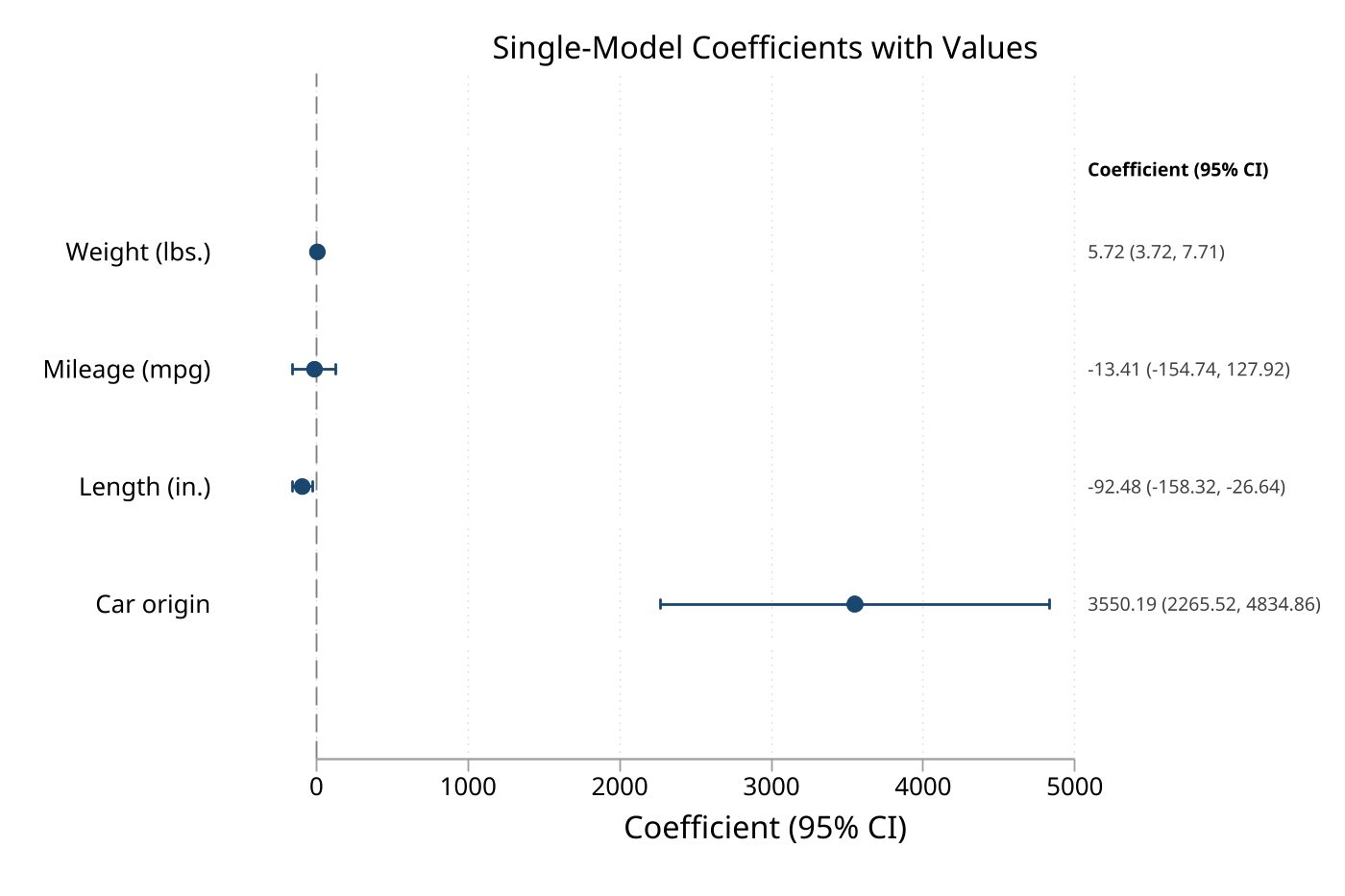 |
values after a single regression |
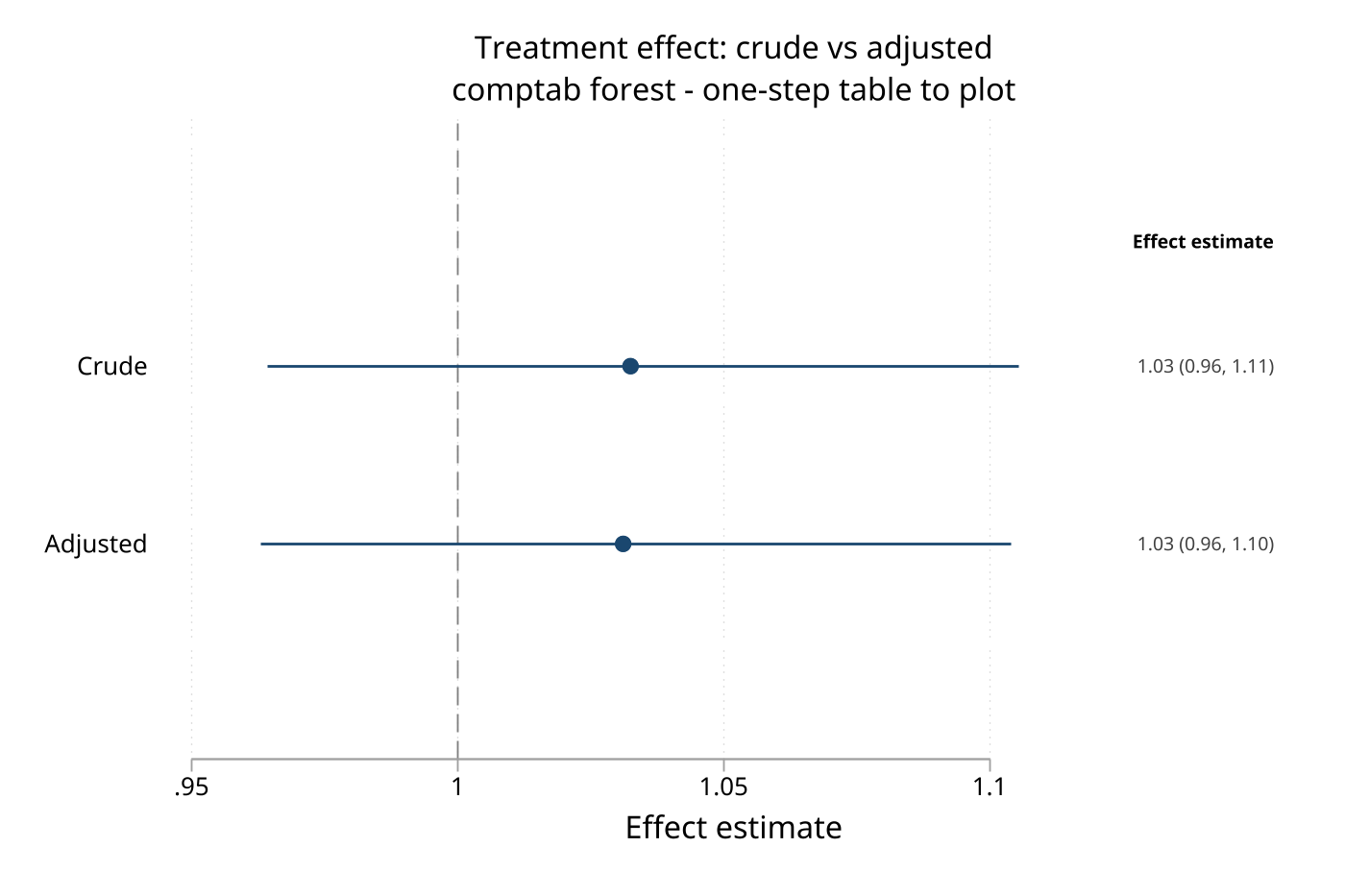 |
comptab forest bridge |
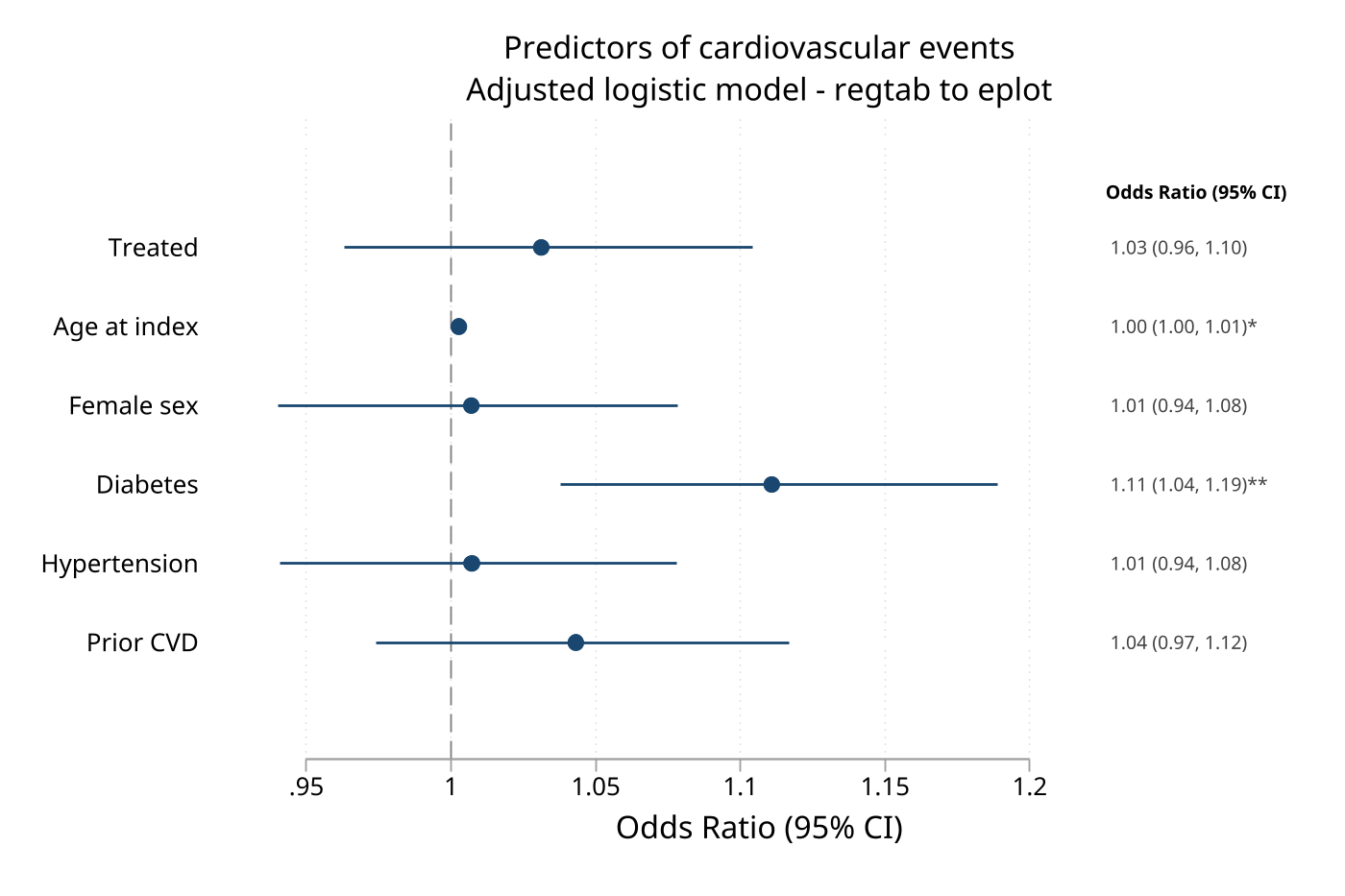 |
regtab to eplot, frame() |
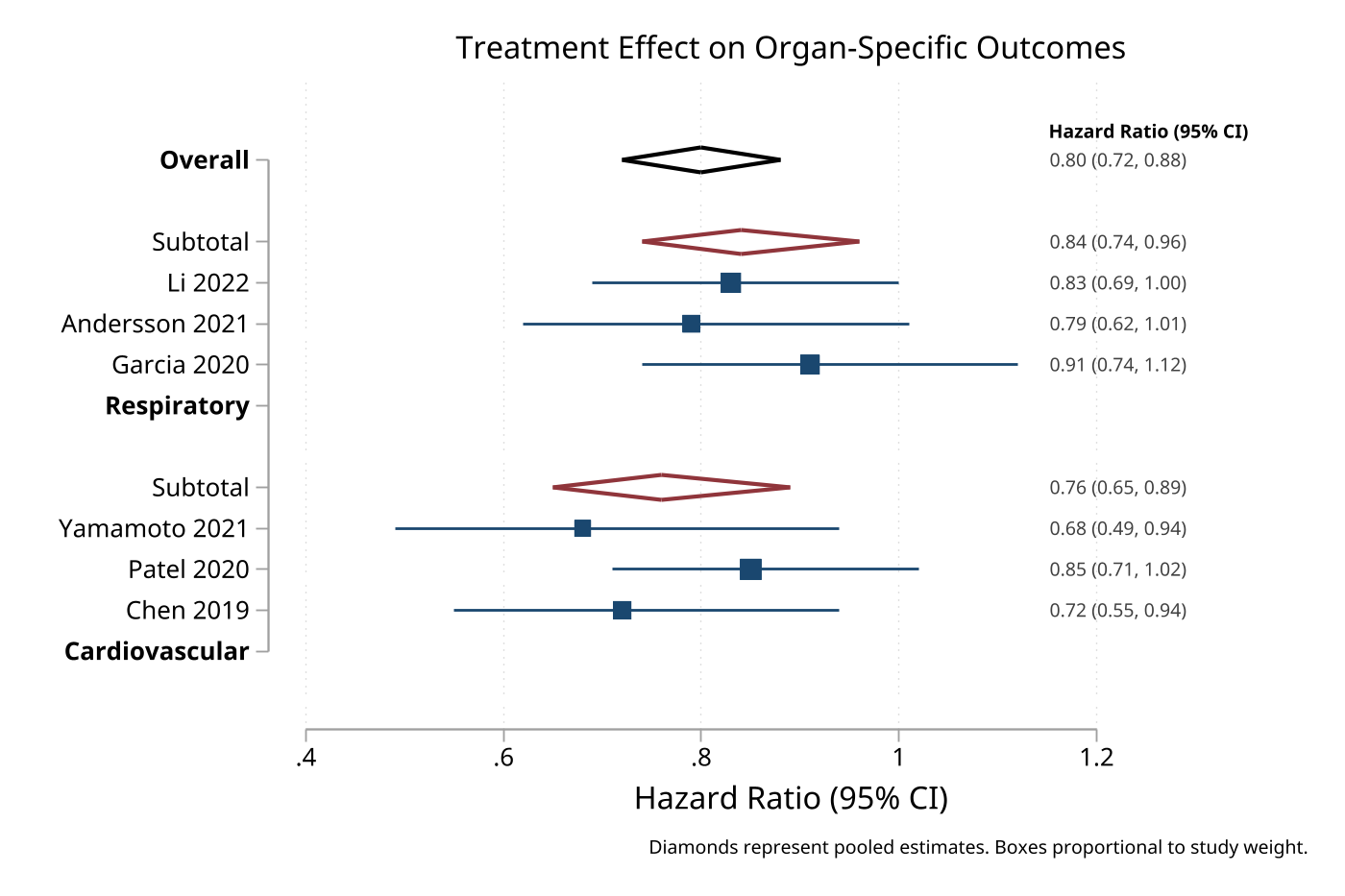 |
type(), weights(), and pooled rows |
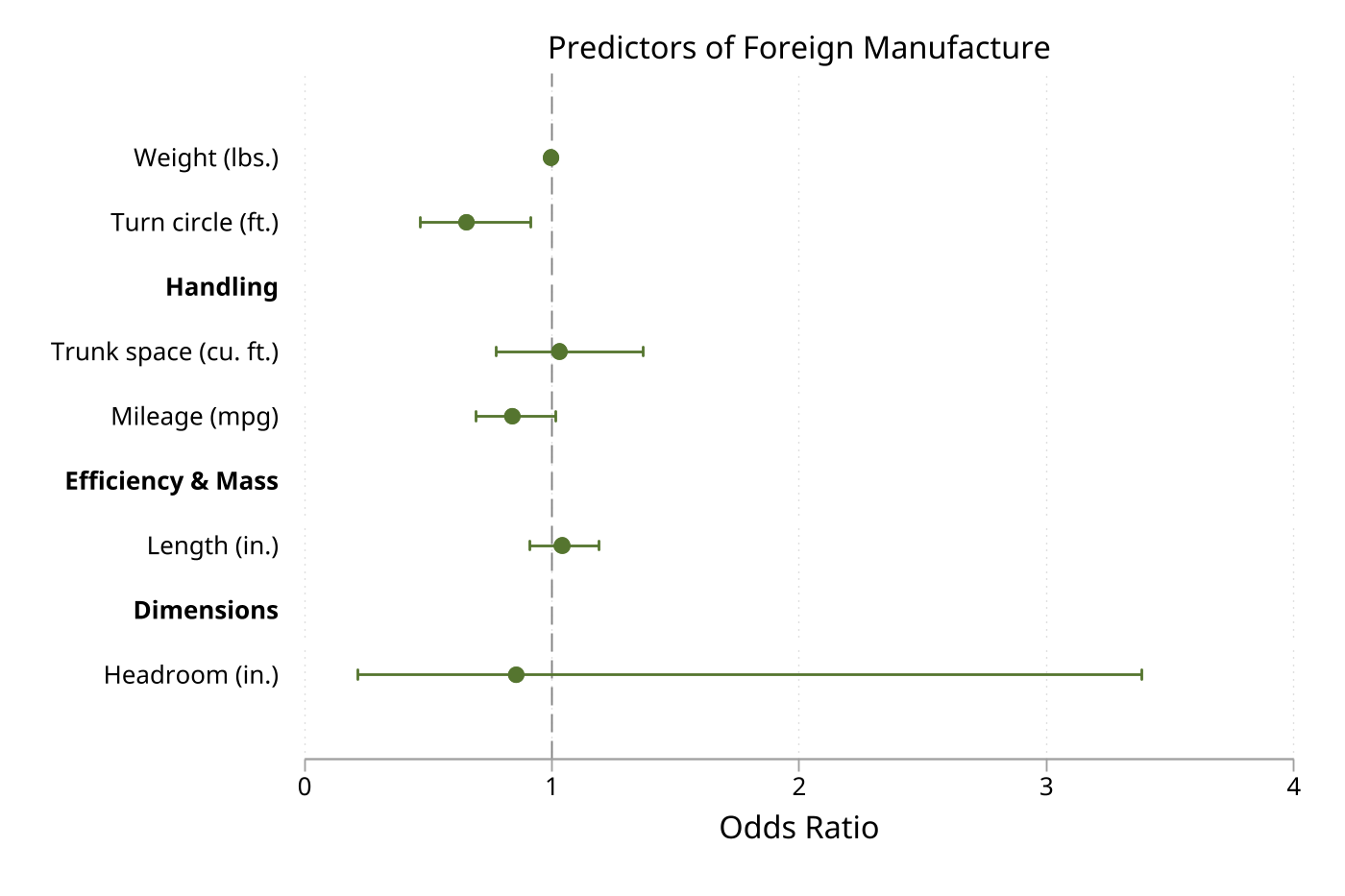 |
groups() and eform |
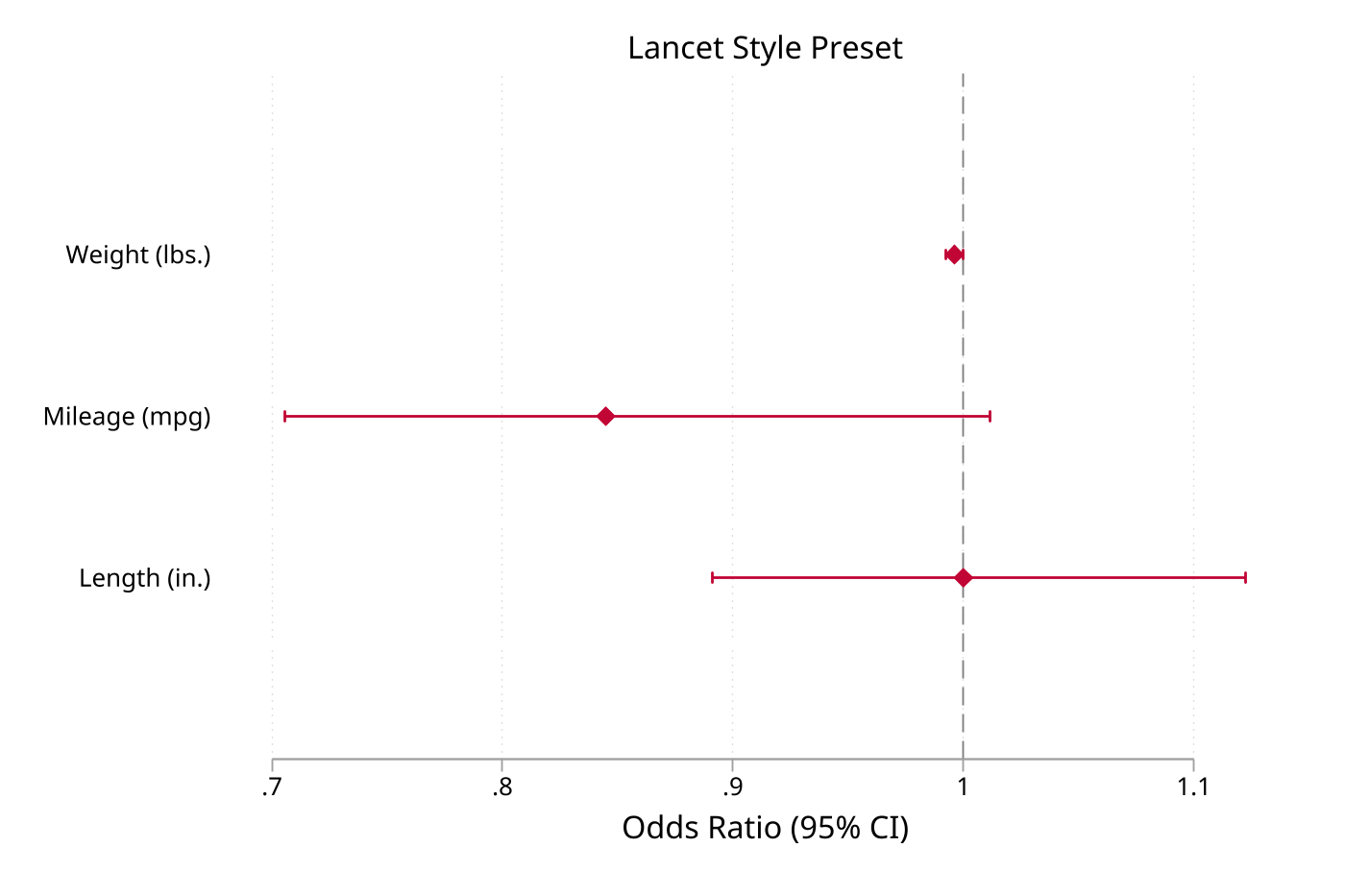 |
style(lancet) |
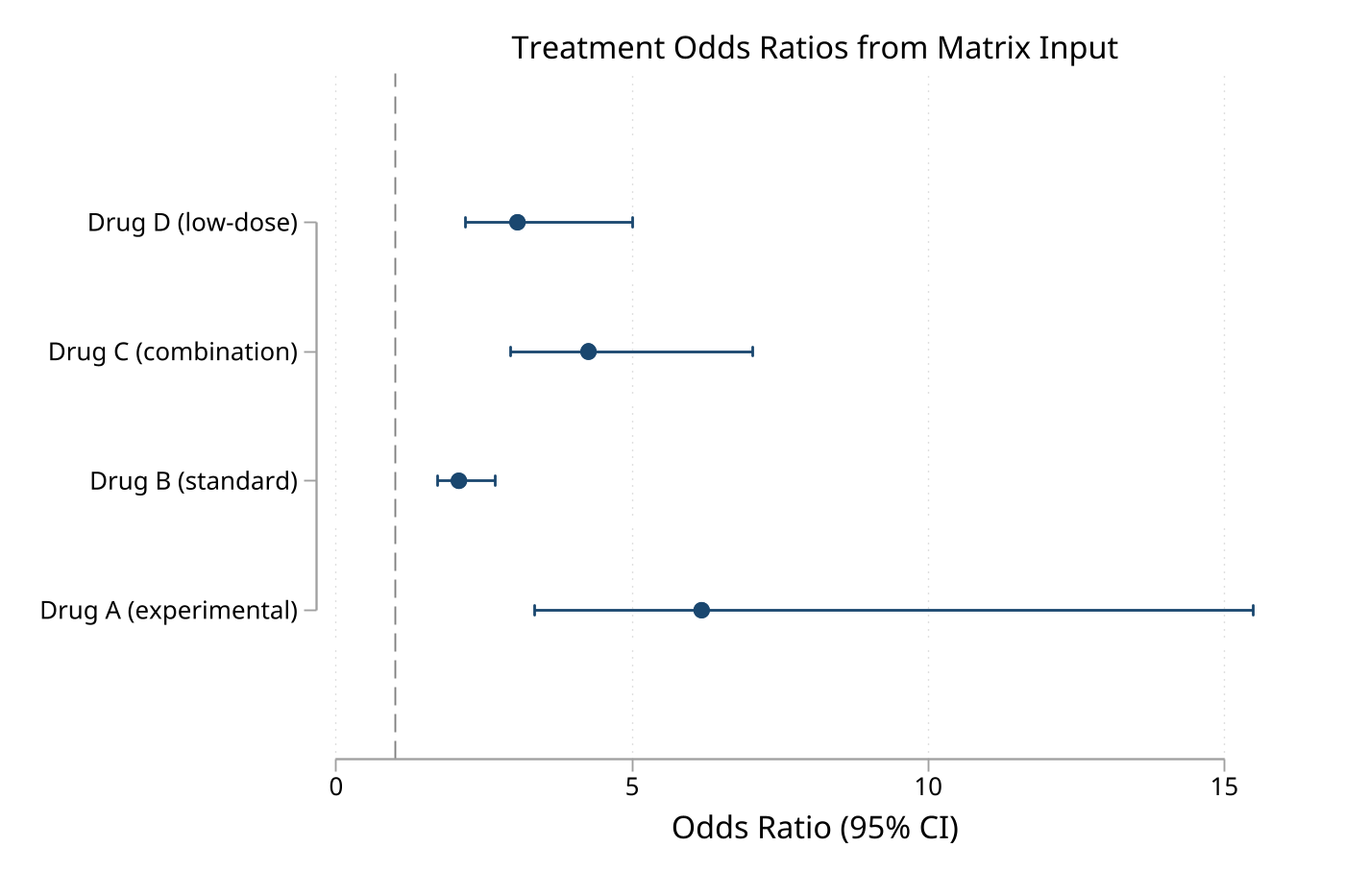 |
matrix() and eform |
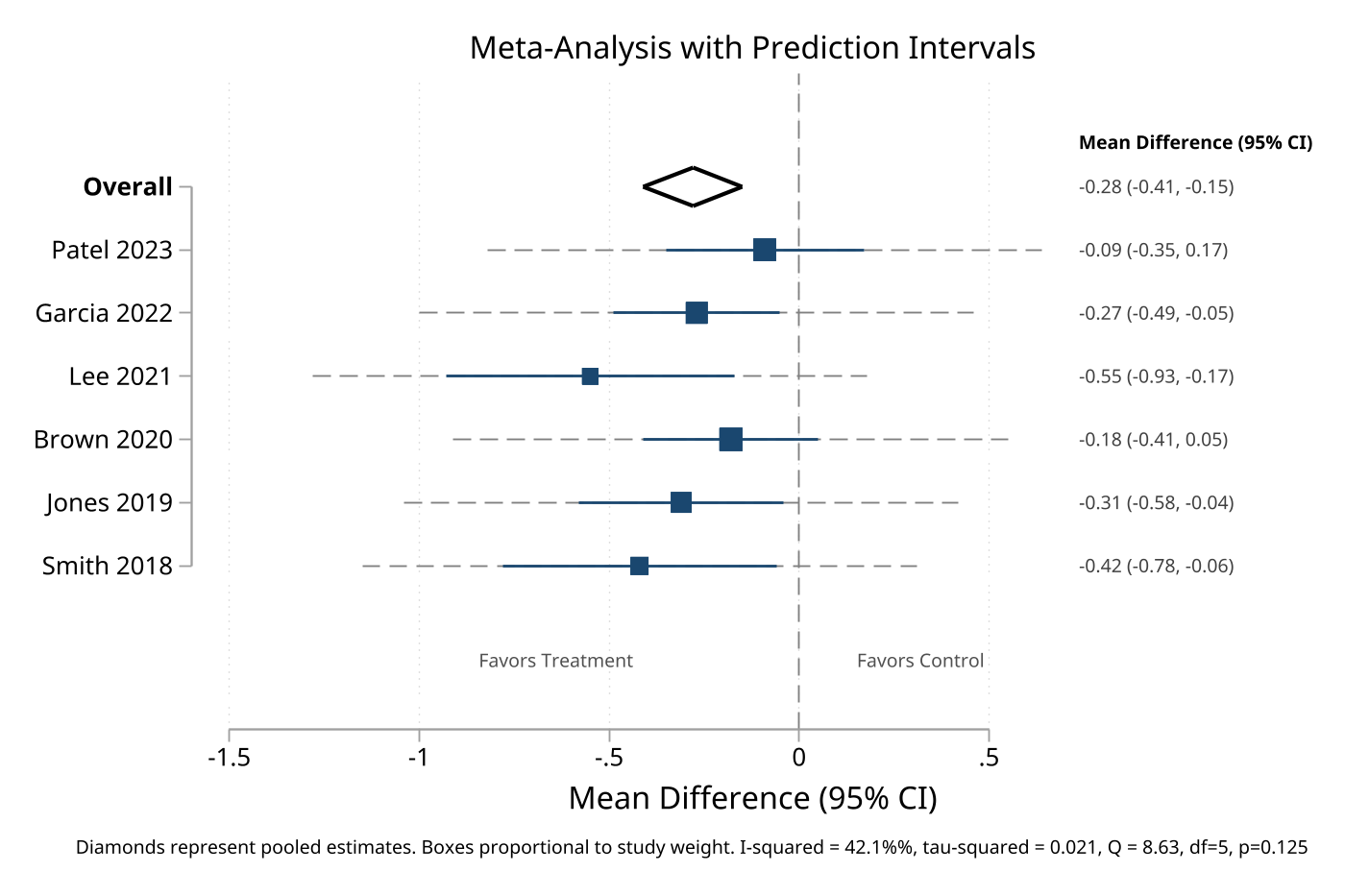 |
pi(), i2(), tau2(), and qstat() |
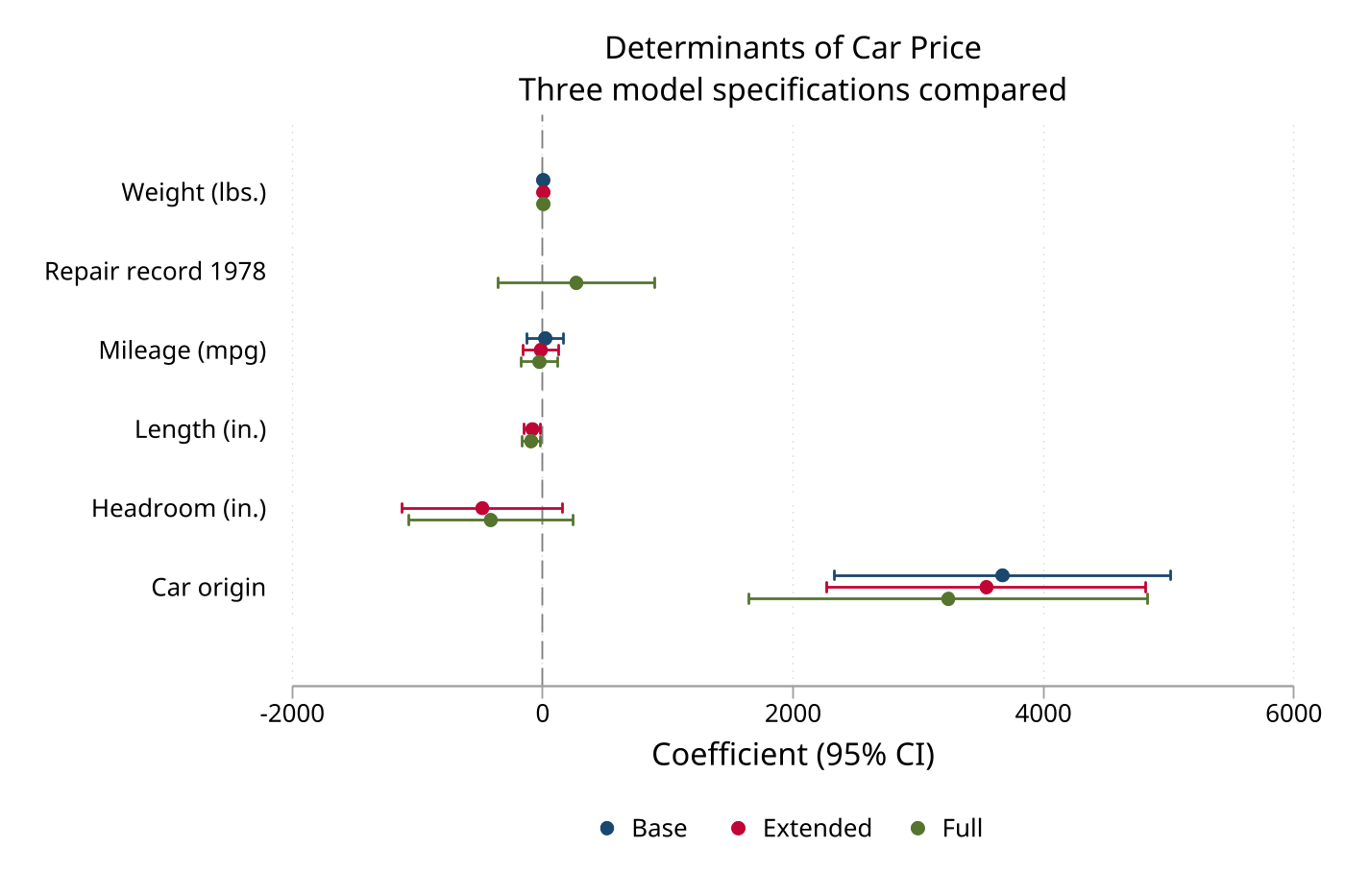 |
modellabels() and palette() |
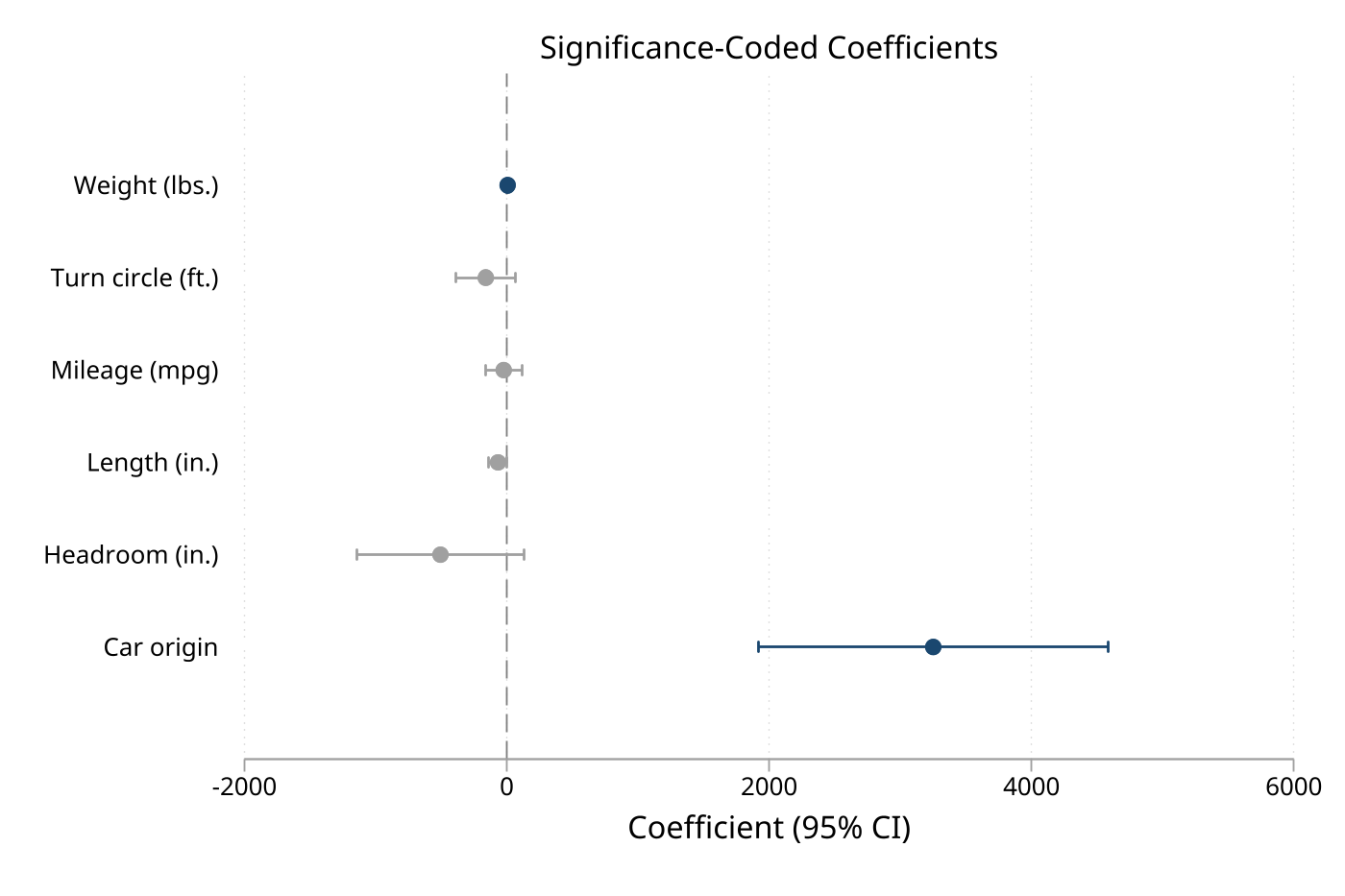 |
sigcolors, sigcolor(), and insigncolor() |
Key Options
Availability tags are D = data, E = estimates, M = matrix, and F = frame. Frame mode accepts the data-mode plotting options after its frame selector. Options not marked with a mode are accepted in all four modes; additional twoway graph options are passed through.
Input and row structure
| Option | Modes | Contract and default |
|---|---|---|
matrix(matname) |
M | Selects a two- or three-column matrix |
frame(framename) |
F | Selects a graph-ready frame |
estimate(varname), ll(varname), ul(varname) |
F | Override frame variables; defaults are estimate, ll, and ul |
labels(varname) |
D, F | String row labels; data mode defaults to Row 1, Row 2, and so on; frame mode auto-detects label |
weights(varname) |
D, F | Numeric marker/box weights; frame mode auto-detects weight, then weights |
type(varname) |
D, F | Row-role variable; omitted rows are regular effects |
rowtype(varname) |
F | Frame synonym for type(); auto-detected when present |
pvalue(varname) |
D, F | Numeric p-values in [0, 1] for stars and r(pvalues); frame mode auto-detects pvalue |
pi(lci_var uci_var) |
D, F | Prediction-limit variables drawn as dashed whiskers behind confidence intervals |
Data/frame type() values are 0 = header, 1 = regular effect, 2 = missing/excluded, 3 = subgroup pooled effect, 4 = heterogeneity row, 5 = overall pooled effect, and 6 = blank spacer. String values effect/regular, header/section, missing/reference, subgroup, hetinfo, overall, and blank are also recognized; unknown values are rejected.
Selection and labeling
| Option | Modes | Contract and default |
|---|---|---|
keep(coeflist) |
D, E, M, F | Keep only listed names; * and ? wildcards are supported |
drop(coeflist) |
D, E, M, F | Drop listed names; * and ? wildcards are supported |
rename(spec) |
E | Rename estimates for display before labels/groups are applied |
noconstant |
D, E, M, F | Add _cons to the drop list |
coeflabels(spec) |
D, E, M, F | Replace displayed coefficient/effect labels |
groups(spec) |
D, E single, F | Insert bold group headers |
headers(spec) / headings(spec) |
D, E single, F | Insert a header before a named effect; headings() is an alias |
gap(#) |
D, E single, F | Extra group spacing; default is 0 |
Transform, reference lines, and intervals
| Option | Modes | Contract and default |
|---|---|---|
eform |
D, E, M, F | Exponentiate estimates and limits; the null defaults to 1 instead of 0 |
rescale(#) |
D, E, M, F | Multiply estimates and limits; negative factors preserve lower/upper ordering; default is 1 |
xline(numlist[, line_options]) |
D, E, M, F | Add reference lines; bare positions use a light dashed style |
xlabel(spec) |
D, E, M, F | Set effect-axis ticks in either orientation |
null(#) |
D, E, M, F | Null line position; default is 0, or 1 with eform |
nonull |
D, E, M, F | Suppress the null line |
level(#) |
E, M | Confidence level for constructed intervals; default is current c(level), normally 95 |
noci |
D, E, M, F | Suppress confidence-interval whiskers |
cicap |
D, E, M, F | Use capped rcap intervals instead of rspike |
Display, significance, and meta-analysis
| Option | Modes | Contract and default |
|---|---|---|
dp(#) |
D, E, M, F | Decimal places for values; default is 2 |
effect(string) |
D, E, M, F | Effect-axis title; data/frame default to Estimate (95% CI) or Effect (95% CI) with eform, while estimates/matrix use the current CI level |
values |
D, E single, M, F | Annotate rows with estimate and interval text; requires horizontal layout |
vformat(fmt) |
D, E, M, F | Numeric values format; default is %5.2f, or a format based on dp() |
stars |
D, E single, M 2-column, F | Append p-value stars to values; data mode requires pvalue(), while frame mode uses pvalue() or an auto-detected pvalue variable |
sigcolors |
D, E single, M, F | Color single-model effects by whether the interval excludes null(); multi-model estimates use palette() colors |
sigcolor(color) |
D, E single, M, F | Significant-effect color when sigcolors is set; default is cranberry |
insigncolor(color) |
D, E single, M, F | Non-significant-effect color when sigcolors is set; default is gs10 |
favors(left right) |
D, E, M, F | Add directional labels below a horizontal effect axis |
i2(string), tau2(string), qstat(string) |
D, F | Add supplied heterogeneity text to the graph note; values are not computed |
style(name) |
D, E, M, F | Presets: forest, coef, lancet, jama, nejm, and bmj; explicit options override preset defaults |
Layout and model comparison
| Option | Modes | Contract and default |
|---|---|---|
horizontal / vertical |
D, E, M, F | Horizontal is the default; the two orientations are mutually exclusive |
sort |
D, E, M, F | Sort regular effects by estimate; may not be combined with order() |
order(coeflist) |
D, E, M, F | Explicit order; unmatched names are placed last; may not be combined with sort |
modellabels(strlist) |
E | Legend labels in model order |
offset(#) |
E | Vertical model spacing; default is 0.15 |
palette(colorlist) |
E | Model colors; default is navy cranberry forest_green dkorange purple teal maroon olive_teal |
legendopts(string) |
E | Additional legend options; default is rows(1) pos(6) size(small) |
Markers and graph options
| Option | Modes | Contract and default |
|---|---|---|
mcolor(color) |
D, E, M, F | Marker color; default is navy in single-model plots, while multi-model estimates use palette() colors |
msymbol(symbol) |
D, E, M, F | Marker symbol; default is O |
msize(size) |
D, E, M, F | Marker size; default is medium, or medsmall for multi-model estimates |
boxscale(#) |
D, F | Weighted-box scaling; default is 100 percent |
nobox |
D, F | Replace weight-proportional squares with standard markers |
nodiamonds |
D, F | Replace pooled-effect diamonds with standard markers |
cicolor(color) |
D, E, M, F | CI line color; default follows mcolor() in single-model plots, while multi-model estimates use palette() colors |
ciwidth(lwstyle) |
D, E, M, F | CI line width; default is medium |
title(string), subtitle(string), note(string) |
D, E, M, F | Graph title, subtitle, and note |
name(string), saving(filename), scheme(schemename) |
D, E, M, F | Graph name, saved graph path, and scheme |
plotregion(options), graphregion(options), aspect(#) |
D, E, M, F | Standard Stata graph-region and aspect options |
twoway options |
D, E, M, F | Other options are appended to the generated twoway command |
Stored Results
After a successful call, eplot returns r-class results. Use return list and matrix list r(table) to inspect them.
| Result | Type | Meaning |
|---|---|---|
r(N) |
Scalar | Number of display rows, including generated groups()/headers() rows and data/frame non-effect rows retained through type() |
r(k) |
Scalar | Number of regular plotted effects; pooled rows and headers are excluded where applicable |
r(n_models) |
Scalar | Number of models in estimates mode; not returned for other modes |
r(cmd) |
Local macro | Full generated twoway command |
r(table) |
Matrix | b, ll, and ul columns; multi-model estimates use b_1 ll_1 ul_1 ... |
r(pvalues) |
Matrix | P-values when supplied in data/frame mode, available for one-model estimates, or requested for a two-column matrix with stars |
For a single estimates model or a matrix, r(table) is k × 3. For multiple estimates it is k × (3 × number of models), with three columns per model. Data- and frame-mode pooled subgroup and overall rows appear in r(table) even though r(k) counts regular type-1 rows.
Assumptions and Limits
- Data and frame modes take confidence limits from supplied variables;
level()is only for intervals constructed in estimates and matrix modes. - Supplied lower confidence limits may not exceed upper limits; two-column matrix standard errors must be nonnegative.
- Data/frame effect titles therefore default to 95% CI wording; estimates/matrix titles use the current
c(level), and estimates-modeeformcan auto-label odds ratios, hazard ratios, or IRRs from the estimation command. - Matrix mode requires exactly two columns (
b,se) or three columns (b,ll,ul); two-column input is the only matrix form that supportsstars. valuesandfavors()require horizontal layout;valuesis available only for a single estimates model.groups(),headers(), andgap()apply to data/frame mode and single-model estimates; they are ignored for multi-model estimates.eformexponentiates supplied values, sets the null to 1, and suppresses_consautomatically in estimates and matrix modes.- In data mode, three leading numeric variables win mode detection even if their names also match stored estimates; use
eplot .,matrix(), orframe()to disambiguate. - In multi-model estimates,
palette()controls per-model colors;sigcolors,mcolor(), andcicolor()do not override that palette. - Style presets supply defaults only; explicitly supplied options take precedence.
References
- coefplot by Ben Jann — a comprehensive coefficient-plot command available from SSC
- metan — a user-written meta-analysis command available from SSC
- Stata 18+:
meta forestplot— the official meta-analysis forest-plot command
QA
QA suites and how to run them are documented in qa/README.md.
Version History
- 1.2.8 (2026-08-11): Preserved multi-equation coefficient identities and empty estimation state, corrected multi-model
r(k), named-modeleformlabels, and negative rescaling, and added explicit validation for intervals, row types, p-values, conflicting options, covariance matrices, andfavors()labels. - 1.2.7 (2026-08-09): Preserved analytical return values when optional graph saves fail, corrected estimates-mode p-value sizing, and expanded release QA with runnable documentation examples and machine-reconcilable negative-path checks.
- 1.2.6 (2026-08-05): Kept non-effect rows in their original slots when sorting data/frame input; aligned frame-mode option documentation, dynamic confidence-level defaults, row-type aliases, graph-option prose, and the tabtools integration demo with current behavior.
- 1.2.5 (2026-07-10): Returned
r(pvalues)for 2-column matrix input withstars, as documented; rows with unavailable p-values are now excluded consistently from the estimates-mode p-value matrix. - 1.2.4 (2026-07-06):
xline()now accepts an optionalline_optionsclause after the positions, while barexline(numlist)keeps the default light dashed look. - 1.2.3 (2026-06-15): Internal hygiene declared label-mutating helpers
nclassand aligned the estimates-mode stars p-value guard with matrix mode; no user-visible behavior change. - 1.2.2 (2026-06-14): Suppressed the category axis line and tick marks by default in data and matrix modes, and made estimates-mode
coeflabels()override variable labels reliably. - 1.2.1 (2026-06-14): Fixed
insigncolor(), restored estimates-mode model order, improved mistyped-estimate errors, and made the ado file safe to re-run in a session. - 1.2.0 (2026-06-06): Added frame input mode through
eplot, frame(framename)with automatic companion-variable detection. - 1.1.1 (2026-04-30): Fixed y-axis ordering across data, estimates, and matrix modes.
- 1.1.0 (2026-04-19): Added
gap(), effect-axisxlabel()passthrough, dynamic values-column margins, and clearer mode detection. - 1.0.0 (2026-04-12): Initial release with data, estimates, and matrix modes, multi-model comparison, journal presets, significance coloring, and meta-analysis features.
Author
Timothy P Copeland, Karolinska Institutet
License
MIT; see the repository license.