logdoc
Reporting & VisualizationConvert Stata SMCL/log files to HTML, Markdown, Word, LaTeX, Quarto, or PDF
Version 1.1.5 | 2026-08-11
logdoc converts Stata .smcl and .log files into shareable HTML, Markdown, Quarto Markdown, Word, LaTeX, or PDF documents, and can run .do files before conversion. It is for Stata users who want to preserve output alignment and, for SMCL input, Stata's input/result/error colors while adding optional report controls.
Quick Start
Capture a small SMCL log, check the Python setup, and render a self-contained HTML document:
capture log close _all
log using "analysis.smcl", replace smcl name(logdoc_demo) nomsg
sysuse auto, clear
* # Data Overview
summarize price mpg weight
* # Regression Results
regress price mpg weight
log close logdoc_demo

logdoc_py
logdoc using "analysis.smcl", output("analysis.html") replace
The default HTML keeps Stata's monospace alignment, input/result/error coloring, tables, and horizontal rules close to the original log.
Requirements
- Stata 16.0 or later.
- Python 3.6 or later; ordinary HTML, Markdown, Quarto Markdown, and LaTeX conversion uses only the Python standard library.
format(docx)requires Stata 17.0 or later because it uses Stata'shtml2docx.format(pdf)requires either the optional Python packagexhtml2pdfor thewkhtmltopdfsystem executable.- The
runoption requires a batch Stata executable onPATH, unlessstataexe()supplies its name or path.
Installation
Install the released package from Stata's Command window:
capture ado uninstall logdoc
net install logdoc, from("https://raw.githubusercontent.com/tpcopeland/Stata-Tools/main/logdoc/") replace
logdoc_py
logdoc_py should report a Python 3.6+ executable and the bundled renderer. If Stata's Python is not configured, set it once or select a Python executable for the current session:
set python_exec "/path/to/python3", permanently
logdoc_py

logdoc_py, python("/path/to/python3") set
To save a project-local Python choice in .logdocrc, use logdoc_py, python("/path/to/python3") save replace. To enable PDF output with the preferred converter, run:
logdoc_py, install(xhtml2pdf)
logdoc_py, check pdf
Commands
| Command | Description |
|---|---|
logdoc |
Convert an existing SMCL or plain-text log, or run a .do file and convert its log |
logdoc start / logdoc stop |
Capture an interactive session and convert it when the session ends |
logdoc diff |
Produce an HTML side-by-side comparison of two logs |
logdoc batch |
Convert all files matching a pattern into an output directory |
logdoc combine |
Merge two or more logs into one source-sectioned document |
logdoc replay |
Repeat the most recent conversion with a theme, format, or open override |
logdoc_py |
Find, check, select, and save the Python executable used by logdoc |
A dialog interface for the main conversion command is available with db logdoc.
How It Works
logdoc parses SMCL or plain-text logs into command, output, table, error, and graph blocks, then sends them to the bundled logdoc_render.py renderer. HTML is faithful by default and self-contained: the selected CSS is included in the document, and graph images resolved from the log are embedded as base64 data.
Enhancements are opt-in so that the default HTML remains a readable Stata transcript. highlight, tables, fold, copy, and download add semantic controls; legacy enables all five together, while notebook, toc, linenumbers, email, annotations, filtering, and accent colors are independent features.
| Input | Behavior |
|---|---|
.smcl |
Preserves Stata's SMCL input, result, and error styling |
.log |
Converts plain-text log content without SMCL color information |
.do |
Requires run; executes the do-file in a child Stata session, captures an SMCL log, and converts it |
| Format | Result |
|---|---|
html |
Self-contained HTML with inlined CSS and graph images embedded when they can be resolved |
md |
Markdown with YAML front matter and Markdown image references |
qmd |
Quarto-flavored Markdown with YAML front matter; it is rendered Markdown, not executable chunks |
both |
HTML and Markdown from one conversion |
docx |
Word document through Stata's html2docx; Stata 17+ is required |
tex |
LaTeX document with listings and booktabs |
pdf |
PDF through xhtml2pdf first, then wkhtmltopdf |
If format() is omitted, the output extension selects md, qmd, tex, docx, or pdf; otherwise the default is html. With format(both), an .html output path produces a matching .md file, an .md path produces a matching .html file, and a path without an extension produces both formats with those extensions.
Configuration values use one key=value entry per line. logdoc reads ~/.logdocrc first and then .logdocrc in the current working directory, so project settings override global settings and command options override both. The Python companion uses the same configuration files; its default candidate order is Stata's configured Python, $LOGDOC_PYTHON, configuration files, and platform commands such as python3 or python.
Worked Examples
1. Convert an existing SMCL log
The following creates a real Stata log with section markers and converts it to HTML:
capture log close _all
log using "analysis.smcl", replace smcl name(analysis) nomsg
sysuse auto, clear
* # Data Overview
summarize price mpg weight
* # Regression Results
regress price mpg weight
log close analysis

logdoc using "analysis.smcl", output("analysis.html") replace
2. Select Markdown or produce both formats
Output extensions are detected automatically. format(both) writes HTML and Markdown from the same input.
logdoc using "analysis.smcl", output("analysis.md") replace
logdoc using "analysis.smcl", output("analysis.html") format(both) replace
3. Add a table of contents and HTML controls
The toc option turns * # Section Title comments in the log into headings. legacy enables syntax highlighting, parsed supported tables, folding, copy buttons, and Download .do controls.
logdoc using "analysis.smcl", output("analysis_enhanced.html") ///
    legacy toc linenumbers generated replace
4. Filter a dark-theme report
keep() and drop() accept pipe-delimited regular-expression patterns matched against command text. nodots removes Stata's dot prompts from the displayed command blocks.
logdoc using "analysis.smcl", output("regressions.html") ///
    theme(dark) keep("regress|margins") nodots replace
5. Capture a live session
logdoc start opens a temporary SMCL log and sets the session line size to 255; logdoc stop closes the log, restores the previous line size, and converts the captured session.
logdoc start, output("session.html") theme(dark) notebook replace
sysuse auto, clear
summarize price mpg
regress price mpg weight
logdoc stop
6. Run a do-file before conversion
With an existing analysis.do, run executes it in a child Stata session and converts the resulting SMCL log. The output is automatically replaceable, and stataexe() can override the detected child executable. If the child do-file fails, logdoc returns its exact Stata return code, leaves the output untouched, and reports the preserved child log.
logdoc using "analysis.do", output("run.html") run
logdoc using "analysis.do", output("run_custom.html") ///
    run stataexe("stata-mp")
7. Batch, combine, and compare logs
These commands operate on existing log files. combine requires at least two sources, while diff always produces HTML.
logdoc batch, input("logs/*.smcl") outdir("reports") replace
logdoc combine using "logs/setup.smcl" "logs/models.smcl" ///
    output("reports/project.html") toc replace
logdoc diff using "logs/old.smcl", compare("logs/new.smcl") ///
    output("reports/diff.html") replace
8. Append and replay a conversion
Append mode adds a second log to an existing HTML, Markdown, Quarto Markdown, LaTeX, or dual-format output. An HTML target must already be a logdoc document, and its footer is preserved. Replay remembers the last resolved conversion settings and accepts theme, format, and open overrides.
logdoc using "analysis.smcl", output("project.html") replace
logdoc using "followup.smcl", output("project.html") append

logdoc using "analysis.smcl", output("replay.html") ///
    title("Analysis") replace
logdoc replay, theme(dark)
9. Diagnose Python and PDF support
Use verbose to see each Python candidate and set or save to keep the selected executable for the session or project.
logdoc_py, python("/path/to/python3") verbose
logdoc_py, python("/path/to/python3") set
logdoc_py, python("/path/to/python3") save replace
logdoc_py, check pdf
Demo
Regenerate the checked-in examples by running do logdoc/demo/demo_logdoc.do from the Stata-Tools repository root. The script exercises themes, graph embedding, enhancements, filters, annotations, batch/combine/diff/replay, live sessions, and output formats; the demo files are checkout assets rather than part of the net install payload.
| Preview or artifact | Focus |
|---|---|
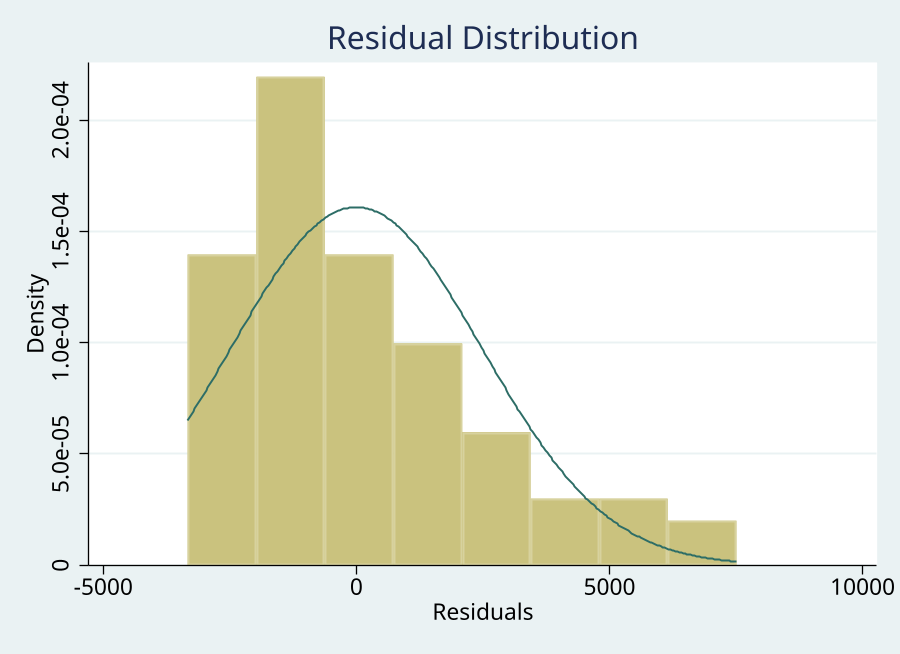 |
Graph detection and HTML embedding |
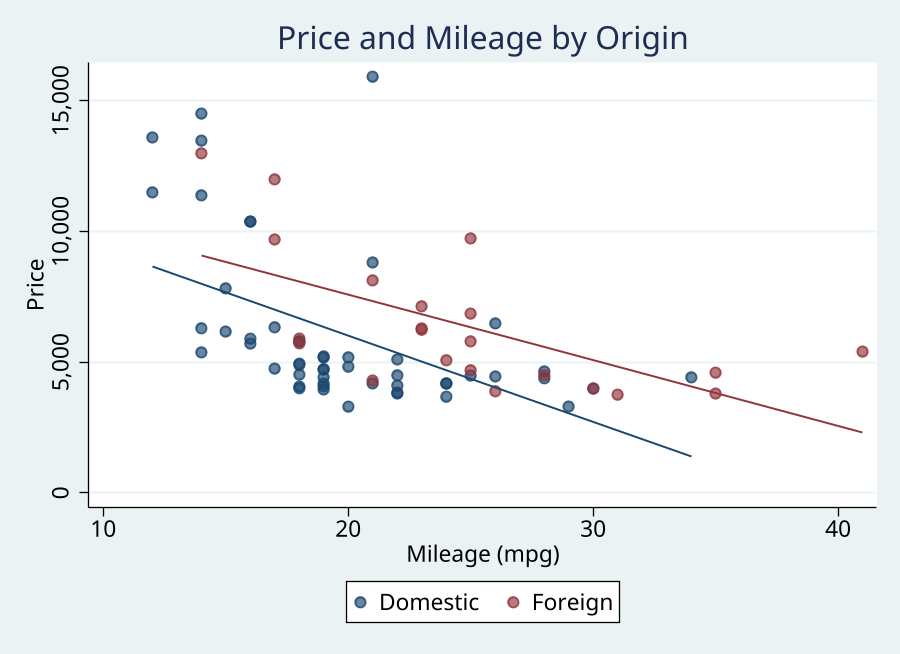 |
A second log and graph export |
sample_light.html |
Faithful default HTML |
sample_enhanced.html |
legacy, toc, line numbers, and generated footer |
sample_notebook.html |
Notebook-style cells |
sample_diff.html |
Side-by-side log comparison |
sample_both.html and sample_both.md |
Dual HTML and Markdown output |
sample_pdf.pdf |
PDF output when a converter is available |
Command Reference
logdoc syntax
logdoc using filename, output(filename) [options]
logdoc start, output(filename) [options]
logdoc stop
logdoc diff using file1, compare(file2) output(filename) [replace theme(string) python(string) css(filename) accent(#RRGGBB) quiet]
logdoc batch, input(pattern) outdir(path) [options]
logdoc combine using file1 file2 [...], output(filename) [options]
logdoc replay [, theme() format() open]
output() is required for conversion, live-session start, diff, and combine. input() and outdir() are required for batch; compare() and output() are required for diff; combine needs two or more source files.
Subcommand constraints
logdoc startaccepts the conversion display and metadata options but notrunorstataexe();logdoc stoptakes no options.logdoc diffalways writes HTML and acceptsreplace,theme(),python(),css(),accent(), andquiet.logdoc batchdefaults to HTML and writes each matching input basename to the chosen output directory with the selected output extension(s).logdoc combinesupportshtml,md,qmd,tex, andboth; it rejectsdocxandpdf.logdoc replayrequires a previous conversion in the current Stata session and reuses all remembered options except for its documented overrides.
logdoc_py syntax and actions
logdoc_py [, check|set|save|install(string) python(path) pdf ///
    replace dryrun quiet verbose]
check is the default action. At most one of check, set, save, and install() may be specified. set stores the selected executable in $LOGDOC_PYTHON for the current session, save writes python=... to .logdocrc in the current working directory, and install() runs -m pip install through the selected executable when an explicit package request is supplied. logdoc itself has no required or optional third-party Python package dependencies.
Key Options
Format and theme
| Option | Accepted value | Default and effect |
|---|---|---|
output(filename) |
Existing or new output path | Required for conversion, start, diff, and combine |
format(string) |
html, md, qmd, both, docx, tex, pdf |
Extension detection; otherwise html |
theme(string) |
light, dark |
light |
css(filename) |
Existing CSS file | Built-in theme CSS |
accent(#RRGGBB) |
Six-digit hexadecimal color | None; applied after css() |
Document metadata
| Option | Effect | Default |
|---|---|---|
title(string) |
Sets the document title | Input filename |
date(string) |
Adds a date subtitle | None |
footer(string) |
Adds custom footer text | None |
generated |
Adds a generated timestamp footer | Off |
stamp |
Adds Stata version, edition, date/time, and current data filename to the header | Off |
Display and layout
| Option | Effect | Default |
|---|---|---|
run |
Executes a .do file in batch mode before conversion and automatically enables replace |
Off |
stataexe(string) |
Overrides the child Stata executable used by run; an error without run |
Auto-detected from flavor and operating system |
preformatted |
Compatibility option; keeps HTML tables monospace unless tables is requested |
Off |
nofold |
Compatibility option; suppresses folding | Folding is already off |
nodots |
Removes dot prompts from command blocks | Off |
fold |
Collapses long output blocks into expandable sections | Off |
highlight |
Adds conservative Stata syntax highlighting | Off |
tables |
Parses supported tables into HTML table elements, with monospace fallback if parsing fails | Off |
copy |
Adds copy-to-clipboard buttons to command blocks | Off |
download |
Adds a Download .do toolbar button |
Off |
legacy |
Enables highlight, tables, fold, copy, and download together |
Off |
linenumbers |
Adds line numbers to command blocks | Off |
toc |
Builds a table of contents from section-marker comments such as * # Results |
Off |
notebook |
Uses Jupyter-style In and Out cell labels |
Off |
email |
Inlines CSS and removes the <style> block for email clients |
Off |
nograph |
Skips graph detection and embedding | Graph detection enabled |
graphwidth(#) |
Sets embedded graph display width in pixels | Renderer default |
graphheight(#) |
Sets embedded graph display height in pixels | Renderer default |
Filtering and other controls
| Option | Effect | Default |
|---|---|---|
keep(string) |
Retains commands matching pipe-delimited regular-expression patterns | None |
drop(string) |
Removes commands matching pipe-delimited regular-expression patterns | None |
open |
Opens the primary output in the default browser or application | Off |
append |
Appends to an existing html, md, qmd, tex, or both output |
Off |
annotate(filename) |
Adds notes using @block N: text or @command "pattern": text entries |
None |
python(string) |
Selects an explicit Python 3 executable | Stata Python, then configured and system candidates |
quiet |
Suppresses status messages | Off |
verbose |
Shows renderer processing details | Off |
replace |
Allows overwriting existing output files | Off |
quiet and verbose are mutually exclusive. append does not require replace, but it is not supported for docx or pdf; run enables replace automatically. Graph dimensions control display size, while graph export ..., width() and height() control the source image resolution.
logdoc_py options
| Option or action | Effect | Default |
|---|---|---|
check |
Checks Python and the bundled renderer | Default action |
set |
Stores the selected executable in $LOGDOC_PYTHON for this session |
Off |
save |
Writes or updates python=... in .logdocrc |
Off |
install(string) |
Runs an explicit pip installation with the selected Python | Off |
python(path) |
Checks only the supplied Python executable | Automatic candidate search |
pdf |
Checks xhtml2pdf and wkhtmltopdf |
Off |
replace |
Allows save to replace an existing python= entry |
Off |
dryrun |
Shows the pip command without installing; only valid with install() |
Off |
quiet |
Suppresses nonessential output | Off |
verbose |
Shows candidate and renderer checks | Off |
logdoc_py checks candidates in this order when python() is omitted: Stata's configured Python, $LOGDOC_PYTHON, python= in global then project .logdocrc, and platform commands such as python3, python, or py -3. quiet and verbose are mutually exclusive.
Stored Results
logdoc results
Conversion, logdoc stop, logdoc combine, and logdoc replay return the conversion results below. r(secondary) is present only for format(both).
| Result | Type | Meaning |
|---|---|---|
r(output) |
Macro | Output path supplied or resolved |
r(input) |
Macro | Input path used for rendering; with run, this may be the captured temporary log |
r(format) |
Macro | Format used |
r(theme) |
Macro | Theme used |
r(accent) |
Macro | Accent color, if supplied |
r(secondary) |
Macro | Secondary output path for format(both) |
r(nblocks) |
Scalar | Number of rendered content blocks |
r(filesize) |
Scalar | Output size in bytes |
r(ngraphs) |
Scalar | Detected graph export commands |
r(ntables) |
Scalar | Detected table blocks |
r(nwarnings) |
Scalar | Renderer warnings, such as unresolved graph files |
logdoc combine additionally returns r(n_sources), the number of source files combined. logdoc batch returns r(n_files) and r(n_failed). logdoc diff returns the macros r(output), r(input), and r(compare).
logdoc_py results
On a successful call, logdoc_py returns:
| Result | Type | Meaning |
|---|---|---|
r(ok) |
Scalar | 1 when the requested action completes |
r(python_ok) |
Scalar | 1 when a usable Python executable was found |
r(renderer_ok) |
Scalar | 1 when logdoc_render.py was found and passed its smoke check |
r(pdf_ok) |
Scalar | 1 when xhtml2pdf or wkhtmltopdf is available; present only with pdf |
r(installed) |
Scalar | Installation status for install(); present only for that action |
r(python) |
Macro | Selected Python executable |
r(python_version) |
Macro | Python version string |
r(python_source) |
Macro | Candidate source: option, global, config, stata, or path |
r(renderer) |
Macro | Path to logdoc_render.py |
r(config) |
Macro | Configuration path when a configuration file was read or written |
r(xhtml2pdf) |
Macro | installed when the preferred PDF library is available |
r(wkhtmltopdf) |
Macro | Path or command name when wkhtmltopdf is found |
r(required) |
Macro | Required Python packages; empty for current logdoc |
r(optional) |
Macro | Optional Python packages; empty for current logdoc |
r(missing) |
Macro | Missing Python packages; empty for current logdoc |
r(install_cmd) |
Macro | Pip command used or proposed by dryrun |
Assumptions and Limits
- SMCL is the preferred input because plain
.logfiles do not retain Stata's input, result, and error color tags. - Graphs are embedded when a
graph exportcommand is detected and the referenced image can be resolved; use a path relative to the log or an absolute path for reliability.nographdisables this scan. - HTML embeds graph images, while Markdown, Quarto Markdown, and LaTeX use image references that must remain resolvable when the output is moved.
format(qmd)produces rendered Markdown with Quarto front matter; it does not create executable Quarto code cells.format(docx)is unavailable before Stata 17.format(pdf)needsxhtml2pdforwkhtmltopdf; check it withlogdoc_py, check pdf.logdoc combinedoes not create Word or PDF output.appendis unsupported for Word and PDF.- A source file and any derived output path must be different; collisions are rejected before execution or rendering.
- An existing output file requires
replace, except whenappendis used;runsetsreplaceautomatically. - PDF conversion writes a temporary candidate and replaces the destination only after the converter succeeds.
logdoc stoppermits only one active session. If conversion fails, it preserves the captured SMCL log and reports a command that can convert it manually.- Input, output, annotation, CSS, Python, and pip-package values that contain shell-control characters are rejected before an external shell call.
- The default renderer favors faithful monospace output. Use
tablesonly when the supported table parser is appropriate; unsupported or ambiguous tables remain monospace.
QA
QA suites and how to run them are documented in qa/README.md.
Version History
- 1.1.5 (2026-08-11): Prevent source/output collisions and partial PDF writes; propagate child Stata failures; preserve valid HTML structure, blank table cells, repeated graph exports, custom footers, and YAML metadata; harden download controls and pip arguments; validate direct-renderer inputs; and add
stataexe()to the dialog. - 1.1.4 (2026-08-09): Prefer caller-local CSS themes, support
stataexe()paths containing spaces, and render SMCL help links with complete topics and labels; align documented option abbreviations and expand release-surface QA. - 1.1.3 (2026-08-05): Corrected Quarto format and append guidance, aligned the Python setup help, and shortened help-table descriptions for clean Viewer rendering.
- 1.1.2 (2026-07-10): Reject shell-control characters in user-supplied paths, Python executable values, and pip package requests before external shell calls; preserve embedded double quotes when batch, session, and replay commands rebuild options.
- 1.1.1 (2026-07-07): Report conversion failures even when a previous output exists; use UTF-8 output on Windows; re-execute
runconversions during replay; preserve captured session logs on failed conversion; read global.logdocrc; rejectdocxandpdfcombine outputs; and requirestataexe()only withrun. - 1.1.0 (2026-06-14): Add faithful-by-default HTML rendering, opt-in enhancements,
run,combine,accent(), and.logdocrcsupport.
Author
Timothy P Copeland, Karolinska Institutet
License
MIT License