msm
AnalysisMarginal structural models via IPTW for time-varying treatments
Version 1.4.6 | 2026-08-11
msm estimates inverse-probability-weighted marginal structural models for longitudinal person-period data with time-varying treatment and confounding. It takes you from protocol and variable mapping through stabilized IPTW/IPCW, diagnostics, weighted outcome models, counterfactual prediction, plots, exports, and sensitivity analysis.
Quick Start
Use the bundled person-period example to fit a pooled logistic MSM and obtain counterfactual cumulative-incidence predictions:
capture confirm file msm_example.dta
if _rc net get msm, from("https://raw.githubusercontent.com/tpcopeland/Stata-Tools/main/msm") replace
use msm_example.dta, clear

msm_prepare, id(id) period(period) treatment(treatment) ///
    outcome(outcome) covariates(biomarker comorbidity) ///
    baseline_covariates(age sex)
msm_validate
msm_weight, treat_d_cov(biomarker comorbidity age sex) ///
    treat_n_cov(age sex) truncate(1 99) nolog
msm_fit, model(logistic) outcome_cov(age sex) nolog
msm_predict, times(1 3 5 7 9) difference seed(12345)
The prediction compares standardized outcomes under always-treated and never-treated strategies. Add msm_diagnose before msm_fit to inspect weights and longitudinal covariate balance.
Requirements
- Stata 16 or later
- No required external dependencies
- Optional:
psdashfor a per-period propensity-overlap and weight dashboard. Install it separately if needed; the coremsmworkflow does not require it.
Installation
Install the public Stata-Tools package and replace any older copy:
capture ado uninstall msm
net install msm, from("https://raw.githubusercontent.com/tpcopeland/Stata-Tools/main/msm") replace
The command files and help files are installed by net install. Download the ancillary example dataset into the current working directory when you want to run the examples:
net get msm, from("https://raw.githubusercontent.com/tpcopeland/Stata-Tools/main/msm") replace
To use the optional psdash integration, install the public companion package:
net install psdash, from("https://raw.githubusercontent.com/tpcopeland/Stata-Tools/main/psdash") replace
Commands
| Command | Description |
|---|---|
msm |
Show the suite overview or inspect pipeline state |
msm_protocol |
Record the seven components of an MSM study protocol |
msm_prepare |
Map ID, period, treatment, outcome, censoring, and covariate variables |
msm_validate |
Run person-period data-quality checks |
msm_weight |
Estimate stabilized treatment weights and optional censoring weights |
msm_diagnose |
Summarize weights, overlap, effective sample size, and covariate balance |
msm_diagtab |
Export accumulated cross-contrast weight diagnostics to Excel |
msm_fit |
Fit a weighted pooled logistic, linear, or Cox outcome model |
msm_predict |
Predict cumulative incidence or survival under static treatment strategies |
msm_plot |
Draw weight, balance, survival, trajectory, or positivity plots |
msm_report |
Produce one compact report in the Results window, CSV, or Excel |
msm_table |
Export selected or all available pipeline tables to Excel |
msm_sensitivity |
Compute E-values or confounding-strength bounds |
How It Works
msm stores the variable mapping and pipeline contracts in dataset characteristics. Weighting creates named analysis variables; fitting, prediction, balance, diagnostics, and sensitivity results are bound to their upstream artifact, and matrix results are serialized with the dataset where needed. Downstream commands verify ownership and dependencies before using those artifacts.
The usual sequence is:
msm_protocol → msm_prepare → msm_validate → msm_weight
                                             ↓
                                        msm_diagnose
                                             ↓
                                          msm_fit
                                             ↓
                                        msm_predict
                                             ↓
                      msm_plot / msm_report / msm_table / msm_sensitivity
Run msm, status after any step or when reopening a saved dataset. It reports the current stage, mapped variables, available artifacts, fitted model information, and the recommended next command without fitting a model or changing the data. Re-running msm_prepare is the restart point for a changed mapping; it clears downstream weighting, fit, prediction, diagnostic, and sensitivity state.
The weight variables created by msm_weight include _msm_weight (the final treatment-times-censoring weight), _msm_tw_weight, optional _msm_cw_weight, _msm_ps, raw and used treatment/censoring probabilities, and _msm_decision_risk. The persisted risk-set marker keeps post-event and post-censor carry-forward rows out of weight and balance summaries.
Choosing a Workflow
| Goal | Workflow |
|---|---|
| Document the causal question | Run msm_protocol with all seven required components; export it if the protocol belongs in a supplement or manuscript |
| Estimate standardized risks | Use msm_prepare, msm_validate, msm_weight, msm_diagnose, msm_fit, model(logistic), and msm_predict |
| Estimate a weighted identity-scale effect | Use msm_fit, model(linear); its treatment coefficient is a period-specific probability difference, not a standardized cumulative-incidence difference |
| Estimate a weighted hazard ratio | Use msm_fit, model(cox); prediction is unavailable, but reporting, tables, and sensitivity analysis remain available |
| Model delayed or cumulative treatment effects | Use msm_fit, history(lag1 cumulative duration interaction); these built-in terms remain compatible with static-regime prediction |
| Model a continuous treatment-history summary | Use msm_fit, exposure(varname) and, when appropriate, tvcov(varlist); this is estimation-only and disables msm_predict |
| Compare several weighted panels | Call msm_diagnose, accumulate(frame) for each panel and export the resulting frame with msm_diagtab |
Worked Examples
1. Full prediction-ready pipeline
This complete workflow documents the protocol, includes informative censoring, checks the data, fits a pooled logistic MSM, and exports the main results.
net get msm, from("https://raw.githubusercontent.com/tpcopeland/Stata-Tools/main/msm") replace
use msm_example.dta, clear

msm_protocol, ///
    population("Adults followed over discrete periods") ///
    treatment("Always treated versus never treated") ///
    confounders("Time-varying biomarker and comorbidity; baseline age and sex") ///
    outcome("Binary clinical endpoint") ///
    causal_contrast("Risk difference in cumulative incidence") ///
    weight_spec("Stabilized IPTW and IPCW, truncated at 1st and 99th percentiles") ///
    analysis("Pooled logistic MSM with robust SE clustered by ID")

msm_prepare, id(id) period(period) treatment(treatment) ///
    outcome(outcome) censor(censored) ///
    covariates(biomarker comorbidity) baseline_covariates(age sex)
msm_validate, strict verbose
msm_weight, treat_d_cov(biomarker comorbidity age sex) ///
    treat_n_cov(age sex) censor_d_cov(biomarker comorbidity age sex) ///
    censor_n_cov(age sex) truncate(1 99) nolog
msm_diagnose, balance_covariates(biomarker comorbidity age sex) ///
    by_period threshold(0.1)
msm_fit, model(logistic) outcome_cov(age sex) period_spec(quadratic) nolog
msm_predict, times(1 3 5 7 9) difference samples(200) seed(12345)
msm_sensitivity, evalue
msm_report, eform
msm_table, xlsx("msm_results.xlsx") all eform replace
The Excel exporters replace only the report, protocol, or selected table sheets when replace is specified, preserving unrelated sheets in the same workbook.
2. Minimal estimation and prediction
Use this shorter branch when you need the fitted effect and standardized predictions before preparing publication tables.
use msm_example.dta, clear
msm_prepare, id(id) period(period) treatment(treatment) ///
    outcome(outcome) covariates(biomarker comorbidity) ///
    baseline_covariates(age sex)
msm_validate
msm_weight, treat_d_cov(biomarker comorbidity age sex) ///
    treat_n_cov(age sex) nolog
msm_fit, model(logistic) outcome_cov(age sex) nolog
msm, status
msm_predict, times(3 5 7 9) difference seed(12345)
matrix list r(predictions)
The default prediction strategy is both and the default output scale is cumulative incidence. Specify type(survival) for survival instead.
3. Cox estimation without counterfactual prediction
Choose a Cox MSM when the target estimand is a weighted hazard ratio rather than a standardized risk curve.
use msm_example.dta, clear
msm_prepare, id(id) period(period) treatment(treatment) ///
    outcome(outcome) covariates(biomarker comorbidity) ///
    baseline_covariates(age sex)
msm_weight, treat_d_cov(biomarker comorbidity age sex) ///
    treat_n_cov(age sex) nolog
msm_fit, model(cox) outcome_cov(age sex) vce(cluster id) nolog
msm_report, eform
msm_predict does not support Cox or linear fits. Use msm_report, msm_table, or msm_sensitivity after an estimation-only fit.
4. Flexible time bases and censoring weights
Preview a weighting specification before fitting it, then use natural cubic splines when a linear time trend is not adequate.
use msm_example.dta, clear
msm_prepare, id(id) period(period) treatment(treatment) ///
    outcome(outcome) censor(censored) ///
    covariates(biomarker comorbidity) baseline_covariates(age sex)
msm_weight, treat_d_cov(biomarker comorbidity age sex) ///
    treat_n_cov(age sex) censor_d_cov(biomarker comorbidity age sex) ///
    censor_n_cov(age sex) period_d_spec(ns(4)) period_n_spec(ns(4)) preview
return list
msm_weight, treat_d_cov(biomarker comorbidity age sex) ///
    treat_n_cov(age sex) censor_d_cov(biomarker comorbidity age sex) ///
    censor_n_cov(age sex) period_d_spec(ns(4)) period_n_spec(ns(4)) ///
    truncate(1 99) nolog
msm_diagnose, by_period
The default weighting basis is period_d_spec(linear) period_n_spec(none). Type both option names in full because they share the period prefix.
5. Accumulate diagnostics across contrasts
For a loop over separately weighted panels, accumulate one row per panel and render the frame as a single Excel sheet. The example below demonstrates the contract with one bundled panel; the same two commands can be called inside a contrast loop.
use msm_example.dta, clear
msm_prepare, id(id) period(period) treatment(treatment) ///
    outcome(outcome) covariates(biomarker comorbidity) ///
    baseline_covariates(age sex)
msm_weight, treat_d_cov(biomarker comorbidity age sex) ///
    treat_n_cov(age sex) nolog
capture frame drop diagnostics
msm_diagnose, accumulate(diagnostics) ///
    contrast("Example panel") outcome("Binary endpoint")
msm_diagtab, frame(diagnostics) xlsx("contrast_diagnostics.xlsx") ///
    decimals(2) borderstyle(academic) zebra replace
The accumulated frame has one row per contrast with sample size, ESS, weight summaries, extreme-weight counts, and balance summaries.
6. Export a standalone protocol
Protocol documentation does not require a prepared dataset and can be exported before analysis.
msm_protocol, ///
    population("Adults with a chronic condition") ///
    treatment("Drug A initiation versus no initiation") ///
    confounders("Baseline and time-varying measured confounders") ///
    outcome("All-cause mortality") ///
    causal_contrast("Always treated versus never treated") ///
    weight_spec("Stabilized IPTW with explicit positivity policy") ///
    analysis("Weighted pooled logistic regression with clustered SEs") ///
    export("protocol.csv") format(csv) replace
Demo
Regenerate the checked-in graphs and workbooks by running demo/demo_msm.do from a package checkout. The compatibility entry point demo/demo_msm_pipeline.do delegates to the same canonical script.
| Output | Command focus |
|---|---|
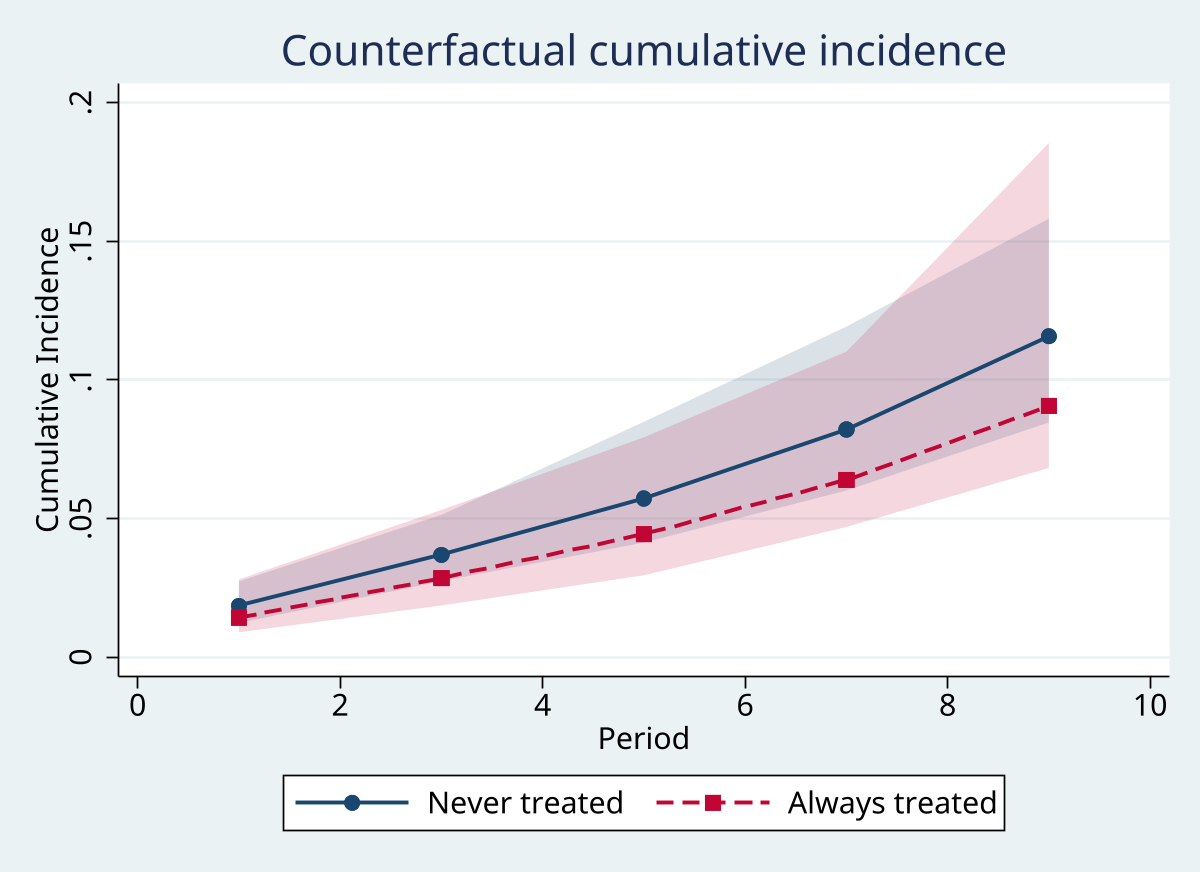 |
msm_plot, type(survival) |
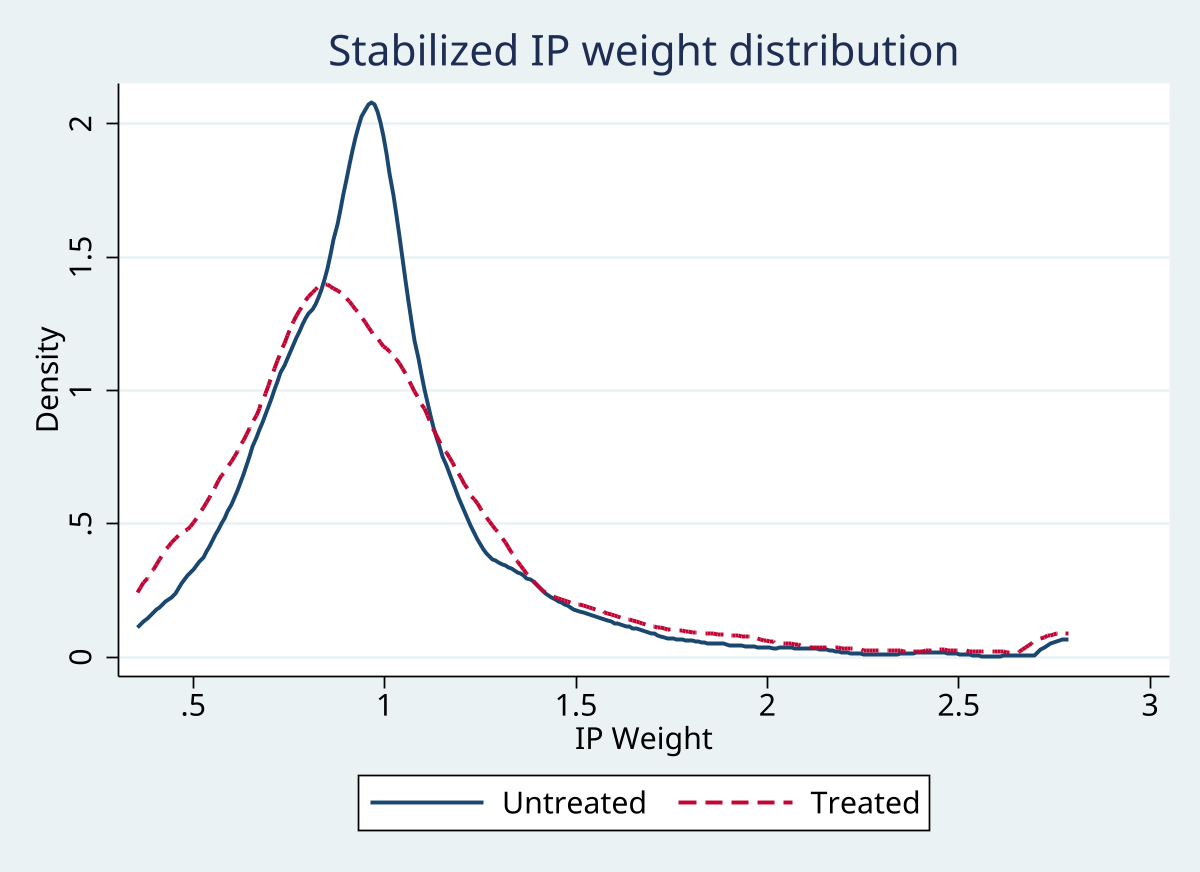 |
msm_plot, type(weights) |
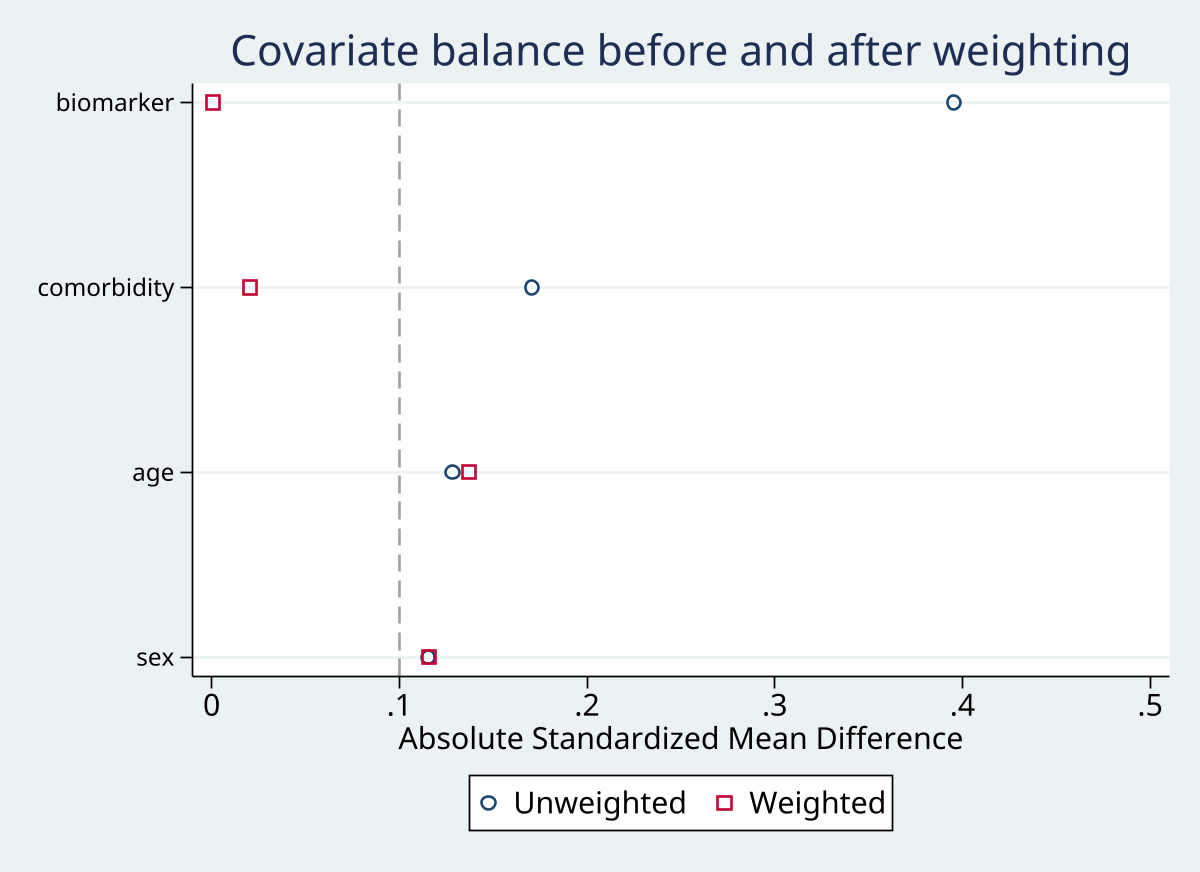 |
msm_plot, type(balance) |
| Protocol workbook | msm_protocol Excel export |
| Compact report workbook | msm_report Excel export |
| Multi-sheet results workbook | msm_table all available sheets |
The demo uses the bundled msm_example.dta data and writes the protocol, report, tables, and graphs into the demo directory.
Command Reference
The signatures below use full option names. Square brackets mark optional syntax; use help command inside Stata for the full command-specific narrative.
msm
Syntax: msm [, list detail protocol status]
Options
| Option | Description |
|---|---|
list |
List the 12 user-facing subcommands |
detail |
Show command-by-command descriptions |
protocol |
Display the seven-component protocol framework |
status |
Report the current stage, mapped variables, artifacts, and next step |
- With no option, displays the suite overview and workflow.
listlists the 12 user-facing subcommands.detailgives a command-by-command description.protocoldisplays the seven-component protocol framework.statusreports the current stage, mapped variables, saved artifacts, and recommended next step without modifying the data.
msm_protocol
Syntax: msm_protocol, population(string) treatment(string) confounders(string) outcome(string) causal_contrast(string) weight_spec(string) analysis(string) [export(string) format(string) replace]
- Required:
population(),treatment(),confounders(),outcome(),causal_contrast(),weight_spec(), andanalysis(). export()supplies the output path for a file export; it is required with non-display formats.format()acceptsdisplay(default),csv,excel, orlatex.replacereplaces the Protocol sheet or an existing CSV, Excel, or LaTeX file.
msm_prepare
Syntax: msm_prepare, id(varname) period(varname) treatment(varname) outcome(varname) [censor(varname) covariates(varlist) baseline_covariates(varlist)]
- Required:
id()identifies individuals;period()is an integer-valued time variable;treatment()andoutcome()are numeric 0/1 indicators. censor()is optional and must be a numeric 0/1 indicator;msm_validatechecks that censoring is terminal before weighting.covariates()defaults to none and identifies time-varying covariates.baseline_covariates()defaults to none and identifies covariates that must be constant within individual.- The command rejects duplicate
id()-period()rows, noninteger periods, nonbinary structural indicators, and varying baseline covariates.
msm_validate
Syntax: msm_validate [, strict verbose]
strictis off by default; when specified, warnings become errors.verboseis off by default; when specified, affected individuals, periods, variables, or positivity cells are described.- The command checks person-period uniqueness, period gaps, terminal outcomes, treatment variation, missingness, small period samples, covariate completeness, treatment histories, censoring patterns, and period-level positivity.
msm_weight
Syntax: msm_weight [, treat_d_cov(varlist) treat_n_cov(varlist) censor_d_cov(varlist) censor_n_cov(varlist) period_d_spec(spec) period_n_spec(spec) truncate(numlist) fitfailure(policy) probpolicy(policy) clip(#) preview replace nolog]
treat_d_cov()defaults to the prepared time-varying plus baseline covariates;treat_n_cov()defaults to no baseline covariates, leaving an intercept and the automatically added lagged treatment.censor_d_cov()is omitted by default; supplying it enables IPCW and requires a mappedcensor()variable.censor_n_cov()defaults to no additional numerator covariates and requirescensor_d_cov().period_d_spec()defaults tolinearandperiod_n_spec()defaults tonone. Each acceptsnone,linear,quadratic,cubic, orns(#).truncate()is off by default; use one percentile for symmetric truncation or two percentiles such astruncate(1 99).fitfailure()defaults toerror.fitfailure(marginal)permits a pooled marginal-probability fallback for a failed logistic model.probpolicy()defaults toerror.probpolicy(clip)requiresclip(#), with0 < # < 0.5, and explicitly repairs missing or boundary probabilities.previewshows the resolved specifications without fitting models or creating weight variables.replaceis off by default and is required to overwrite existing_msm_*weight variables.nologis off by default and suppresses logistic iteration output when specified.
msm_diagnose
Syntax: msm_diagnose [, balance_covariates(varlist) by_period threshold(#) positivity(#) accumulate(name) contrast(string) outcome(string)]
balance_covariates()defaults to all covariates registered bymsm_prepare.by_periodis off by default and prints weight statistics separately by period.threshold()defaults to0.1for weighted-SMD balance flags.positivity()defaults to0.01and is applied to the smallest probability of the treatment actually observed, not simply the lower tail of P(A=1).accumulate(name)is off by default and appends one cross-contrast summary row to a named frame.contrast()is required with it;outcome()is an optional row label.
msm_diagtab
Syntax: msm_diagtab, frame(name) xlsx(filename) [sheet(string) title(string) footnote(string) decimals(#) threshold(#) font(string) fontsize(#) borderstyle(string) zebra open replace]
- Required:
frame()names a nonempty frame produced by repeatedmsm_diagnose, accumulate()calls;xlsx()must end in.xlsx. sheet()defaults toWeight Diagnostics;title()defaults to a per-contrast ESS, weight, and balance title.footnote()defaults to a note defining ESS percentage and the imbalance count.decimals()defaults to3;threshold()defaults to0.1and documents the threshold used for the accumulated balance count.font()defaults toArial;fontsize()defaults to10;borderstyle()defaults tothinand also acceptsmediumoracademic.zebraandopenare off by default.replaceis off by default and replaces only the target sheet when specified.
msm_fit
Syntax: msm_fit [, model(string) outcome_cov(varlist) exposure(varname) tvcov(varlist) history(string) period_spec(string) cluster(varname) vce(string) strata(varlist) bootstrap(#) level(#) nolog]
model()defaults tologisticand acceptslogistic,linear, orcox.outcome_cov()defaults to none and adds time-fixed outcome covariates. Every treatment or censoring numerator covariate must appear here or, for Cox fits, instrata().exposure()defaults to the mapped binary treatment; when supplied it replaces that term with a continuous or time-varying exposure summary.tvcov()defaults to none and adds time-varying outcome covariates for logistic or Cox fits. It may not be combined withhistory()and disables prediction.history()defaults to none, which records theno_carryoverassumption. It accepts any oflag1,cumulative,duration, andinteraction; built-in terms remain prediction-compatible.period_spec()defaults toquadraticand acceptsnone,linear,quadratic,cubic, orns(#).cluster()defaults to the mapped ID and is an alternative tovce(cluster varname).vce()defaults to clustered sandwich SEs at the mapped ID and also acceptsvce(robust).strata()defaults to none and is available only formodel(cox).bootstrap()defaults to0and is reserved; nonzero bootstrap replication is not implemented.level()defaults to the currentc(level).nologis off by default and suppresses the model iteration log when specified.
msm_predict
Syntax: msm_predict, times(numlist) [strategy(string) type(string) samples(#) seed(#) level(#) difference extrapolate]
- Required:
times()gives integer periods on the mapped period scale. strategy()defaults tobothand acceptsalways,never, orboth.type()defaults tocum_incand acceptscum_incorsurvival.differenceis off by default and adds the always-minus-never contrast on the selected scale whenstrategy(both)is used: a risk difference forcum_incor a survival difference forsurvival.samples()defaults to100Monte Carlo draws and must be at least 10.seed()defaults to the current session RNG state; specifying it makes the simulation reproducible.level()defaults toc(level).extrapolateis off by default; without it, requested times must be within the fitted risk-set support.
msm_plot
Syntax: msm_plot, type(string) [covariates(varlist) threshold(#) times(numlist) samples(#) seed(#) n_sample(#) title(string) saving(string) replace]
- Required:
type()acceptsweights,balance,survival,trajectory, orpositivity. Thepositivityplot shows the marginal proportion treated by period; it is an exploratory support screen, not a conditional positivity diagnostic. - For
type(balance),covariates()defaults to denominator-only balance targets;threshold()defaults to0.1. - For
type(survival),times()is required,samples()defaults to50, andseed()defaults to the current session RNG state. - For
type(trajectory),n_sample()defaults to50randomly sampled individuals. title()defaults to a plot-type-specific title;saving()is off by default;replaceis off by default and permits overwriting the saved graph when specified.
msm_report
Syntax: msm_report [, export(string) format(string) decimals(#) eform replace title(string) font(string) fontsize(#) borderstyle(string) zebra footnote(string) open]
format()defaults todisplayand acceptsdisplay,csv, orexcel.export()is required forcsvandexceland is rejected withformat(display).decimals()defaults to4;eformis off by default and displays ORs for logistic models or HRs for Cox models when specified.replaceis off by default and overwrites the CSV or target Excel sheet when specified.- For Excel output,
title()defaults toMSM Analysis Summary,font()toArial,fontsize()to10, andborderstyle()tothin.borderstyle()also acceptsmediumoracademic. zebra,footnote(), andopenare off or empty by default; they control Excel-only presentation.
msm_table
Syntax: msm_table, xlsx(filename) [coefficients predictions balance weights sensitivity all eform decimals(#) sep(string) title(string) replace font(string) fontsize(#) borderstyle(string) nformat(string) zebra boldp(#) highlight(#) footnote(string) open]
- Required:
xlsx()must end in.xlsx. - With no selection flag, or with
all, the command exports every available table and silently skips pipeline artifacts that do not exist. Explicitly requested unavailable tables produce an error. - Selection flags are
coefficients,predictions,balance,weights,sensitivity, andall. eformis off by default;decimals()defaults to3;sep()defaults to", ";title()defaults to a sheet-specific title.replaceis off by default and replaces only selected sheets.font()defaults toArial;fontsize()to10;borderstyle()tothin, withmediumandacademicalso accepted.nformat()is empty by default and supplies an Excel number format;zebra,boldp(),highlight(),footnote(), andopenare off or empty by default.
msm_sensitivity
Syntax: msm_sensitivity [, evalue confounding_strength(# #) level(#) rarethreshold(#) orapprox]
- With no option,
evalueis selected.evaluecomputes point and confidence-limit E-values for logistic or Cox fits; linear fits have no ratio-scale E-value. confounding_strength(# #)supplies hypothetical RR(U,D) and RR(U,Y), each at least 1, and returns the bias factor and bias-adjusted bound on the risk-ratio scale.level()defaults toc(level).rarethreshold()defaults to0.15and determines when a logistic OR or Cox HR is used directly as a risk-ratio scale or transformed for a common outcome. Cumulative incidence is evaluated among subjects and risk-set rows that contributed to the saved fit.orapproxis off by default and forces the raw OR or HR to be used as the risk-ratio scale even for a common outcome.
Stored Results
The commands also persist pipeline state in dataset characteristics so that later commands can recover results after intervening Stata work. The package-specific returned results are:
msm
Always returns r(version), r(commands), and r(n_commands). With status it additionally returns r(stage), r(next_step), r(model), r(id), r(period), r(treatment), r(outcome), r(censor), r(covariates), r(baseline_covariates), and the state indicators r(prepared), r(weighted), r(fitted), r(prediction_saved), r(balance_saved), r(diagnostics_saved), and r(sensitivity_saved).
msm_prepare
Returns the scalars r(N), r(n_ids), r(n_periods), r(period_span), r(n_events), r(n_treated), and r(n_censored), plus the mapping macros r(id), r(period), r(treatment), r(outcome), r(censor), r(covariates), and r(baseline_covariates).
msm_validate
Returns r(n_checks), r(n_errors), r(n_warnings), and the macro r(validation), which is passed when no errors occurred and failed otherwise.
msm_weight
In preview mode, returns the resolved specification macros r(preview), r(treat_d_cov), r(treat_d_cov_source), r(treat_n_cov), r(censor_d_cov), r(censor_n_cov), r(period_d_spec), r(period_n_spec), r(truncate), r(fitfailure_policy), and r(probability_policy), plus r(clip_threshold) when clipping is selected. After fitting it also returns r(mean_weight), r(sd_weight), r(min_weight), r(max_weight), r(p1_weight), r(median_weight), r(p99_weight), r(ess), r(n_truncated), r(n_fitfail_fallback), r(fitfailure_fallback), r(n_probability_repairs), and the matrix r(probability_repairs). The post-fit macros include r(weight_var), r(fitfailure_models), r(probability_models), and the same resolved specification macros.
msm_diagnose
Returns r(mean_weight), r(sd_weight), r(min_weight), r(max_weight), r(p1_weight), r(p99_weight), r(ess), r(ess_pct), r(n_extreme), r(n_unavailable), r(positivity_threshold), r(n_positivity_violations), and r(min_obs_probability). The matrices are r(treatment_balance), r(support), optional r(censor_balance), and the secondary pooled summary r(balance).
msm_fit
In addition to the standard results from glm, regress, or stcox, returns e(msm_cmd), e(msm_model), e(msm_treatment), e(msm_exposure), e(msm_tvcov), e(msm_history_spec), e(msm_history_assumption), e(msm_period_spec), e(msm_vce), e(msm_cluster), e(msm_strata), e(msm_inf_dist), e(msm_inf_df), e(msm_n_clusters), e(msm_n_dropped), and the matrix e(effects). The named matrices _msm_fit_b and _msm_fit_V are persisted for downstream commands.
msm_predict
Returns the matrix r(predictions), the macros r(seed), r(seed_source), r(seed_state), r(type), r(strategy), r(history_spec), r(diff_type), and r(draw_method), plus the scalars r(n_times), r(n_ref), r(samples), r(level), r(min_support), r(max_support), and r(extrapolated). With difference and both strategies, it additionally returns r(rd_#) for cumulative incidence or r(sd_#) for survival at each requested time.
msm_plot
Returns r(plot_type). Weight and balance plots also return r(n_risk); a balance plot additionally returns the signed-SMD matrix r(balance).
msm_report
Returns the macros r(format) and, when an export path was supplied, r(export).
msm_protocol
Returns the seven protocol macros r(population), r(treatment), r(confounders), r(outcome), r(causal_contrast), r(weight_spec), and r(analysis), plus r(format).
msm_sensitivity
Returns the effect and interval scalars r(effect), r(effect_lo), r(effect_hi), and r(effect_se). E-value runs add r(evalue_point) and r(evalue_ci); confounding-strength runs add r(bias_factor), r(bound), the backward-compatible alias r(corrected_effect), r(rr_ud), and r(rr_uy). When available, r(cumulative_incidence), r(outcome_prevalence), and r(rare_threshold) describe the outcome-scale decision for the saved fit sample. The remaining macros are r(effect_label), r(model), r(rr_scale), and r(approximation), with r(metric_produced) indicating whether a ratio-scale metric was produced.
msm_table and msm_diagtab
These are export commands. Their durable output is the Excel workbook; they do not leave package-specific returned results.
Assumptions and Limits
- The causal interpretation requires consistency, sequential exchangeability conditional on the measured history, positivity, and adequate treatment, censoring, and marginal outcome-model specification. The commands document and diagnose parts of these conditions but cannot establish them from the data alone.
- Data must be in long person-period form with unique
id()-period()rows, integer periods, binary treatment and outcome, and a common baseline period. Delayed entry or left truncation is not supported bymsm_weight. - The mapped treatment is intended to vary over time. A treatment assigned once at baseline is outside this suite’s target; consider Stata’s
teffects ipwfor that setting. - The prediction workflow supports only static always-treated, never-treated, or both strategies. Dynamic and stochastic regimes are not implemented.
- The automatic treatment-history term in each weighting logit is only the immediately prior treatment. If exchangeability requires richer lagged, cumulative, or trajectory histories, construct them and include them in
treat_d_cov()and, where relevant,censor_d_cov(). - The default structural model uses current treatment and records
no_carryover. Usehistory(lag1 cumulative duration interaction)for the supported delayed or cumulative terms; the periods must be consecutive and unit-spaced for these terms. outcome_cov()variables must be time-fixed. Treatment and censoring numerator covariates are not balanced away, so they must enter the outcome model or, for Cox fits,strata().exposure()andtvcov()are licensed for treatment-history-derived continuous or time-varying terms, not arbitrary time-varying confounders. They disable counterfactual standardization and thereforemsm_predict.- The censoring models condition on current treatment, following the within-period ordering
L_t → A_t → C_t → Y_t. This is deliberate and differs from the printed sw-dagger formula in Hernán, Brumback, and Robins (2000). - Weighting errors on failed models, missing probabilities, or probabilities at 0 or 1 by default.
fitfailure(marginal)andprobpolicy(clip) clip(#)are explicit sensitivity policies, not proof that positivity holds. msm_predictrejects requested times outside the fitted risk-set support unlessextrapolateis specified. Its Monte Carlo intervals propagate fitted outcome-coefficient covariance only; they condition on estimated weights, model selection, and the fitted reference population.bootstrap()is reserved and nonzero bootstrap replication is not implemented.
Troubleshooting
| Symptom | Response |
|---|---|
msm_validate reports gaps or post-event rows |
Check that each individual has the intended consecutive periods and no observations remain after an outcome or censoring event |
msm_weight rejects delayed entry |
Align the panel to a shared baseline or stop; left truncation is not supported |
| Weight means or ESS are poor | Inspect the denominator and numerator histories, period-specific support, and r(support) before considering a scientifically justified truncation or model revision |
msm_weight reports probability support failure |
Investigate missing predictors, separation, and positivity first; use probpolicy(clip) clip(#) only as an explicitly named sensitivity analysis |
| Balance remains poor | Inspect r(treatment_balance) by period and prior treatment history, and inspect censoring balance separately when IPCW is used |
msm_predict refuses to run |
Confirm that the latest fit used model(logistic) without exposure() or tvcov() and that times() lies within fitted support unless extrapolation is deliberate |
| An Excel export is missing a sheet | Default/all mode exports only available artifacts; request the relevant pipeline step before explicitly selecting a missing sheet |
References
- Robins JM, Hernan MA, Brumback B. Marginal structural models and causal inference in epidemiology. Epidemiology. 2000;11(5):550-560.
- Hernan MA, Brumback B, Robins JM. Marginal structural models to estimate the causal effect of zidovudine on the survival of HIV-positive men. Epidemiology. 2000;11(5):561-570.
- Cole SR, Hernan MA. Constructing inverse probability weights for marginal structural models. American Journal of Epidemiology. 2008;168(6):656-664.
- Austin PC, Stuart EA. Moving towards best practice when using inverse probability of treatment weighting using the propensity score to estimate causal treatment effects in observational studies. Statistics in Medicine. 2015;34(28):3661-3679. doi:10.1002/sim.6607.
- Adenyo D, Guertin JR, Candas B, Sirois C, Talbot D. Evaluation and comparison of covariate balance metrics in studies with time-dependent confounding. Statistics in Medicine. 2024. doi:10.1002/sim.10188.
- VanderWeele TJ, Ding P. Sensitivity analysis in observational research: introducing the E-value. Annals of Internal Medicine. 2017;167(4):268-274.
- Hernan MA, Robins JM. Causal Inference: What If. Boca Raton: Chapman & Hall/CRC, 2020.
QA
QA suites and how to run them are documented in qa/README.md.
Version History
- 1.4.6 (2026-08-11): Bound downstream artifacts to their owning fit or weights, persisted prediction and balance matrices with saved datasets, corrected fitted-sample sensitivity incidence and RR-scale labels, and exported confounding-strength assumptions and bounds.
- 1.4.5 (2026-08-05): Made seeded Monte Carlo prediction intervals reproducible across numerically equivalent refits by using the symmetric positive-semidefinite covariance square root.
- 1.4.4 (2026-08-05): Refused rank-deficient fitted specifications before committing package state and corrected stored-result documentation.
- 1.4.3 (2026-07-29): Hardened empty-dataset handling in
msm_prepareand aligned the flagship version readout with its shipped header. - 1.4.2 (2026-07-28): Corrected weighted SMD definitions, risk-set plotting, signed-period survival plots, diagnostic reuse, and interpretation of fitted support and conditional Monte Carlo intervals.
- 1.4.1 (2026-07-27): Refined installed help and documentation contracts for the released user surface.
- 1.4.0 (2026-07-26): Added configurable denominator and numerator time bases, including natural cubic splines, with prior-weight-preserving defaults.
- 1.3.0 (2026-07-25): Corrected observed-treatment positivity diagnostics, risk-set pooling, observation-order restoration, and fitted-sample metadata.
- 1.2.4 (2026-07-23): Improved Excel export failure propagation and contextual interpretation of E-values and confounding bounds.
- 1.2.3 (2026-07-04): Improved the failure message for time-invariant treatment processes and documented the baseline-treatment alternative.
- 1.2.2 (2026-07-02): Corrected protective-effect sensitivity bounds, natural-spline edge cases, Excel title handling, weight-specification display, and missing SMD reporting.
- 1.2.1 (2026-06-25): Added a known-truth recovery workflow for the marginal structural log-odds.
- 1.2.0 (2026-06-17): Added continuous exposure and time-varying companion terms for estimation-only dose-duration analyses.
- 1.1.0 (2026-06-14): Added the retained per-period propensity variable and the optional
psdashdiagnostic contract. - 1.0.4 (2026-05-29): Added accumulated cross-contrast weight diagnostics and the
msm_diagtabExcel export. - 1.0.3 (2026-05-06): Added explicit
vce()control and Coxstrata()support. - 1.0.2 (2026-05-06): Hardened state invalidation, missing-weight handling, export restoration, and binary-outcome scope guidance.
- 1.0.1 (2026-04-30): Hardened validation edge cases, time-fixed outcome-covariate enforcement, Cox guidance, and protocol export escaping.
- 1.0.0 (2026-04-26): Initial Stata-Tools release of the MSM workflow suite.
Author
Timothy P Copeland, Karolinska Institutet
License
MIT