tabtools
Reporting & VisualizationPublication-ready Excel tables (table1_tc, regtab, effecttab, stratetab, tablex)
Version 1.14.2 | 2026-08-11
tabtools is a Stata suite for turning descriptive, model, survival, rate, diagnostic, simulation, and composite results into publication-ready Excel and GitHub-Flavored Markdown tables. The commands share output conventions, formatting themes, frames, and stored-result contracts so a table can move from analysis to a report or downstream Stata workflow.
Quick Start
Install the package from the public Stata-Tools distribution, then run a table command from any working directory:
net install tabtools, from("https://raw.githubusercontent.com/tpcopeland/Stata-Tools/main/tabtools") replace
sysuse auto, clear
table1_tc price mpg weight rep78, by(foreign) xlsx("table1.xlsx") sheet("Table 1")
The command displays a Results preview and writes table1.xlsx in the current working directory. Add frame(table1) when later Stata commands should consume the rendered table, or add markdown("table1.md") for a Markdown report.
Requirements
The package has no mandatory user-written Stata dependencies. table1_tc, stacktab, simtab, tabtools, and tabtools_tips run on Stata 16 or newer; desctab, crosstab, corrtab, regtab, effecttab, survtab, stratetab, hrcomptab, comptab, diagtab, and puttab require Stata 17 or newer.
The model and effect commands expect an active Stata collect result created by commands such as regress, logistic, margins, or teffects; they format and arrange that collection rather than fitting a model. survtab requires data declared with stset, while stratetab reads .dta files written by Stata's strate, output() command.
Forest-plot output from comptab and hrcomptab, and plotting graph-ready eplotframe() outputs from regtab and effecttab, require the optional eplot package. The table commands can create those graph-ready frames without eplot. simtab compute mode and from(summary) mode have no external dependency; from(simsum) and from(siman) require the corresponding optional package and its output format.
Installation
Install the released package from the public GitHub distribution with:
net install tabtools, from("https://raw.githubusercontent.com/tpcopeland/Stata-Tools/main/tabtools") replace
If another copy is earlier on the adopath, inspect ado dir and remove only the tabtools package before reinstalling. The public distribution includes the command files, help files, package metadata, and table-of-contents entry; it does not include the repository's demo fixtures or generated demo workbooks.
Commands
The suite contains 16 public commands. The version column is the minimum Stata release for that command.
| Command | Stata | Purpose |
|---|---|---|
table1_tc |
16+ | Baseline Table 1 by group, with continuous, categorical, missingness, tests, and standardized mean differences |
desctab |
17+ | Render an active collect table of descriptive statistics |
crosstab |
17+ | Two-way categorical tables with percentages, tests, and 2x2 effect measures |
corrtab |
17+ | Pearson or Spearman correlation tables with p-values or significance stars |
regtab |
17+ | Render active regression collections with estimates, confidence intervals, statistics, and optional plot frames |
effecttab |
17+ | Render active margins or teffects results, or a supplied effect matrix |
survtab |
17+ | Kaplan–Meier survival, event, risk-set, median, RMST, and group-difference tables |
stratetab |
17+ | Convert saved strate, output() rate files into rate and rate-ratio tables |
hrcomptab |
17+ | Combine a rate frame with model frames for a multi-outcome rate comparison |
comptab |
17+ | Combine compatible regtab or effecttab frames into a composite table |
diagtab |
17+ | Diagnostic accuracy, likelihood ratios, diagnostic odds ratios, ROC AUC, and cutoff analysis |
puttab |
17+ | Put variables, a frame, or a matrix into a formatted workbook or Markdown table |
stacktab |
16+ | Stack or place blocks from an existing workbook into a new worksheet |
simtab |
16+ | Summarize simulation results in compute or simsum/siman/summary ingest mode |
tabtools |
16+ | Inspect and set shared fonts, digits, borders, themes, and persistent profiles |
tabtools_tips |
16+ | Open or print a compact recipe reference for the suite |
How It Works
Most table commands follow the same three-stage pattern: calculate or receive results, render a table in Results, then optionally export or expose that same rendered structure. The export targets are independent, so a command can write Excel, CSV, Markdown, a Stata frame, or an eplot-ready frame in one call when that command supports the target.
xlsx() is the main Excel option and excel() is retained as a synonym on commands that support both names. sheet() selects the worksheet. open opens an Excel target after writing it and therefore requires an xlsx() or using target. csv() exports the visible table data for commands that offer it; markdown() writes GitHub-Flavored Markdown, and mdappend appends to an existing Markdown file rather than replacing it.
frame(name[, replace]) stores the rendered table in a Stata frame for later composition or inspection. eplotframe(name[, replace]) stores graph-ready estimates, confidence limits, p-values, labels, and model identifiers for the model/effect commands that support it. comptab consumes compatible model/effect frames, and hrcomptab consumes a rate frame plus model frames.
Shared formatting options include theme(), borderstyle(), headershade, headercolor(), zebra, zebracolor(), title(), footnote(), boldp(), and highlight() where supported. Named themes are lancet, nejm, bmj, apa, jama, plos, nature, cell, and annals; custom uses the supplied formatting settings. A fresh session resolves the shared baseline as Arial 10-point text with thin borders, while command-specific precision and display defaults are listed below.
Choosing a Workflow
| Need | Start with | Add or follow with |
|---|---|---|
| Baseline characteristics by one group variable | table1_tc |
smd, test, xlsx(), frame() |
A table/collect descriptive result |
desctab |
compose(), keep()/drop(), statorder() |
| Two categorical variables | crosstab |
rowpct, colpct, or, rr, rd, fisher, trend, or cochran |
| Correlations | corrtab |
spearman, lower, upper, full, pvalues, or star() |
| Regression model collection | regtab |
stats(), keep()/drop(), eplotframe(), or frame() |
| Marginal effects or treatment effects | effecttab |
from(), type(), clean, full, or eplotframe() |
| Survival probabilities or RMST | survtab |
times(), by(), median, riskset, rmst(), or difference |
Incidence rates from strate |
stratetab |
outlabels(), rateratio, or a later hrcomptab |
| Several model/effect results | comptab |
compatible source frames and rows() |
| Rates plus model estimates | hrcomptab |
modelframes(), rows(), and optional forest |
| Diagnostic accuracy | diagtab |
cutoff(), cutoffs(), auc, optimal, exact, or prevalence() |
| A dataset, frame, or matrix as a table | puttab |
using, frame(), matrix(), varlabels, or noheader |
| Existing Excel blocks | stacktab |
blocks(), layout(hstack), append, or sheetreplace |
| Simulation summaries | simtab |
compute mode, from(summary), or optional from(simsum)/from(siman) |
Features
- One output vocabulary across descriptive, modeling, survival, rates, diagnostics, simulation, and composite workflows.
- Excel workbooks with named sheets, titles, notes, footnotes, borders, header colors, zebra striping, significance emphasis, and optional post-write opening.
- GitHub-Flavored Markdown, CSV, Stata frames, and graph-ready eplot frames where supported.
- Shared session defaults for font, font size, border style, theme, numeric digits, and p-value emphasis through
tabtools setandtabtools get. - Explicit confidence-level provenance for collection-based and saved-rate workflows, with errors for conflicting or unavailable levels instead of silently substituting a value.
- Strict
smallcells(#)disclosure control fortable1_tc,desctab, andcrosstab, with primary, complementary, and dependent-result suppression applied before any output sink.
Workbook cell types
Every exported workbook cell is written as text, including cells that look numeric. This is deliberate: the majority of published table cells are composite or annotated strings — 5,351 (60), 0.82 (0.69, 0.98), <0.001, 0.54***, Reference — and the commands render each cell to its final string before any sink runs. Re-deriving a numeric type by reparsing the rendered string would have to guess, and would silently convert an annotated cell into a number that no longer matches the table.
The practical consequence is that Excel will not sum, chart, or numerically sort a column of an exported sheet without a conversion step in Excel. For a numeric payload, use frame() (Stata frames, with the underlying numeric columns where a command provides them), the r() matrices such as r(table) and r(cutoff_table), or eplotframe() for plotting.
Worked Examples
Baseline table
sysuse auto, clear
table1_tc price mpg weight rep78, by(foreign) smd test frame(table1, replace) xlsx("table1.xlsx")
table1_tc detects the supplied variables when vars() is omitted. Use vars() for explicit row types such as contn, conts, cat, bin, and their extended forms; smd requires by(), and clear is available when the rendered table should replace the data in memory.
To protect exact counts below a publication threshold in table1_tc, desctab, or crosstab, add smallcells(#). Primary cells are shown as <#, complementary cells as ≥#, and dependent statistics as Suppressed; every requested sink receives the same already-redacted table. After safety is certified, the engine deterministically removes complementary markers one at a time whenever the protected counts remain non-exact. Each remaining ≥# is therefore individually necessary in the final table, although the result is not guaranteed to use the globally smallest possible number of complementary markers.
table1_tc rep78, by(foreign) vars(rep78 cat) total(after) smallcells(5) frame(table1_safe, replace)
Shared formatting profile
Use the controller to inspect the suite, set a custom theme, and save it for reuse in another session:
tabtools, detail category(models)
tabtools set theme custom, font(Arial) fontsize(10) borderstyle(thin) permanent profile("tabtools_project.do")
tabtools use using "tabtools_project.do"
tabtools get
Use tabtools, list for the compact catalog, or replace category(models) with another catalog category. The profile contains ordinary tabtools set commands and can be version controlled with a project.
Descriptive collect table
sysuse auto, clear
collect clear
table foreign, statistic(count price) statistic(mean price) statistic(sd price)
desctab, compose(mean_sd) frame(descriptive, replace) xlsx("descriptive.xlsx")
desctab consumes the active collect result and can arrange rows and columns with keep(), drop(), statorder(), and statlabels(). The built-in compose() presets include events_n_pct, events_n, n_pct, mean_sd, mean_semean, median_iqr, median_range, and mean_ci.
For disclosure-controlled output, desctab, smallcells(#) accepts recognized count, frequency, and fvfrequency layouts plus the named compose(n_pct) preset. It maps exact collect result/dimension identifiers and fails before output for arbitrary compositions, other statistics, filtered layouts, or shapes whose count lineage cannot be proved.
Regression and effects
sysuse auto, clear
collect clear
collect: logistic foreign mpg weight
regtab, frame(regression, replace) eplotframe(regression_plot, replace) xlsx("regression.xlsx")

collect clear
collect: margins, at(mpg=(15 25 35))
effecttab, frame(effects, replace) xlsx("effects.xlsx")
regtab and effecttab format active collections; they do not fit models. Both can also feed a composite table, and their eplotframe() output can be plotted by the optional eplot package.
Categorical, correlation, and diagnostic tables
sysuse auto, clear
crosstab foreign rep78, rowpct fisher smallcells(5) xlsx("crosstab.xlsx")
corrtab price mpg weight, spearman full pvalues markdown("correlations.md")
diagtab mpg foreign, cutoff(22) xlsx("diagnostics.xlsx")
crosstab defaults to column percentages and uses a sparse-cell exact test when appropriate. With smallcells(#), it protects the count block and margins, withholds percentages whose numerator or denominator is protected, and suppresses count-dependent tests and effect measures. corrtab defaults to Pearson correlations and the lower triangle; diagtab uses Wilson intervals by default and accepts continuous tests through cutoff(), cutoffs(), auc, or optimal.
Survival and rates
webuse drugtr, clear
stset studytime, failure(died)
survtab, times(1 2 3) by(drug) median riskset xlsx("survival.xlsx")

webuse diet, clear
stset dox, failure(fail)
strate hienergy, per(1) output(rate_hienergy, replace)
stratetab, using("rate_hienergy") outcomes(1) xlsx("rates.xlsx")
survtab reports Kaplan–Meier quantities at the requested times. stratetab expects the saved strate files in exposure-major, outcome-minor order and uses outcomes() to interpret that file sequence.
Composite model table
sysuse auto, clear
collect clear
collect: regress price mpg weight
regtab, frame(model, replace)
collect clear
collect: regress price mpg weight length
regtab, frame(model2, replace)
comptab model model2, rows("1 2 \ 1 2") xlsx("composite.xlsx")
The source frames must contain compatible row labels. rows() takes one numeric row specification per source frame, separated by \; here 1 2 \ 1 2 selects the first two rows from both frames. Use relabel() or section() when the displayed row names or section structure need to be changed; use hrcomptab when one of the source frames is a stratetab rate frame.
Direct table output
sysuse auto, clear
puttab price mpg weight using "selected.xlsx", sheet("Table") varlabels
puttab price mpg weight, markdown("selected.md")
puttab accepts a current-data varlist, frame(name), or matrix(name) as its one source. An Excel using target is required for workbook output, while Markdown-only output does not need a workbook.
Simulation summary
clear
set obs 20
set seed 42
generate str8 estimator = "demo"
generate estimate = rnormal(1, .2)
generate se = .2
generate true = 1
simtab estimator, estimate(estimate) se(se) true(true) display xlsx("simulation.xlsx")
Compute mode derives simulation metrics from one observation per replication and can group by by() and estimand(). Ingest mode uses from(simsum), from(siman), or from(summary) with the corresponding mapping options; plotframe() exposes numeric results for graphs.
Demo
The checked-in demo is a repository-checkout workflow. Run demo/demo_tabtools.do with its documented all, main, or simtab argument to regenerate the example workbooks and Markdown report; the demo uses the repository's _data/ fixtures and writes results under demo/. The checked-in set is 15 workbooks (80 sheets total) plus the Markdown report.
The table1_tc, desctab, and crosstab workbooks each contain paired smallcells(5) examples. The Small Cells Primary sheets use a 2×2 table with counts 2/3/3/2, so only below-threshold cells are hidden as <5. The Small Cells Complement sheets use counts 2/8/6/4, which also hide reconstructive cells as ≥5.
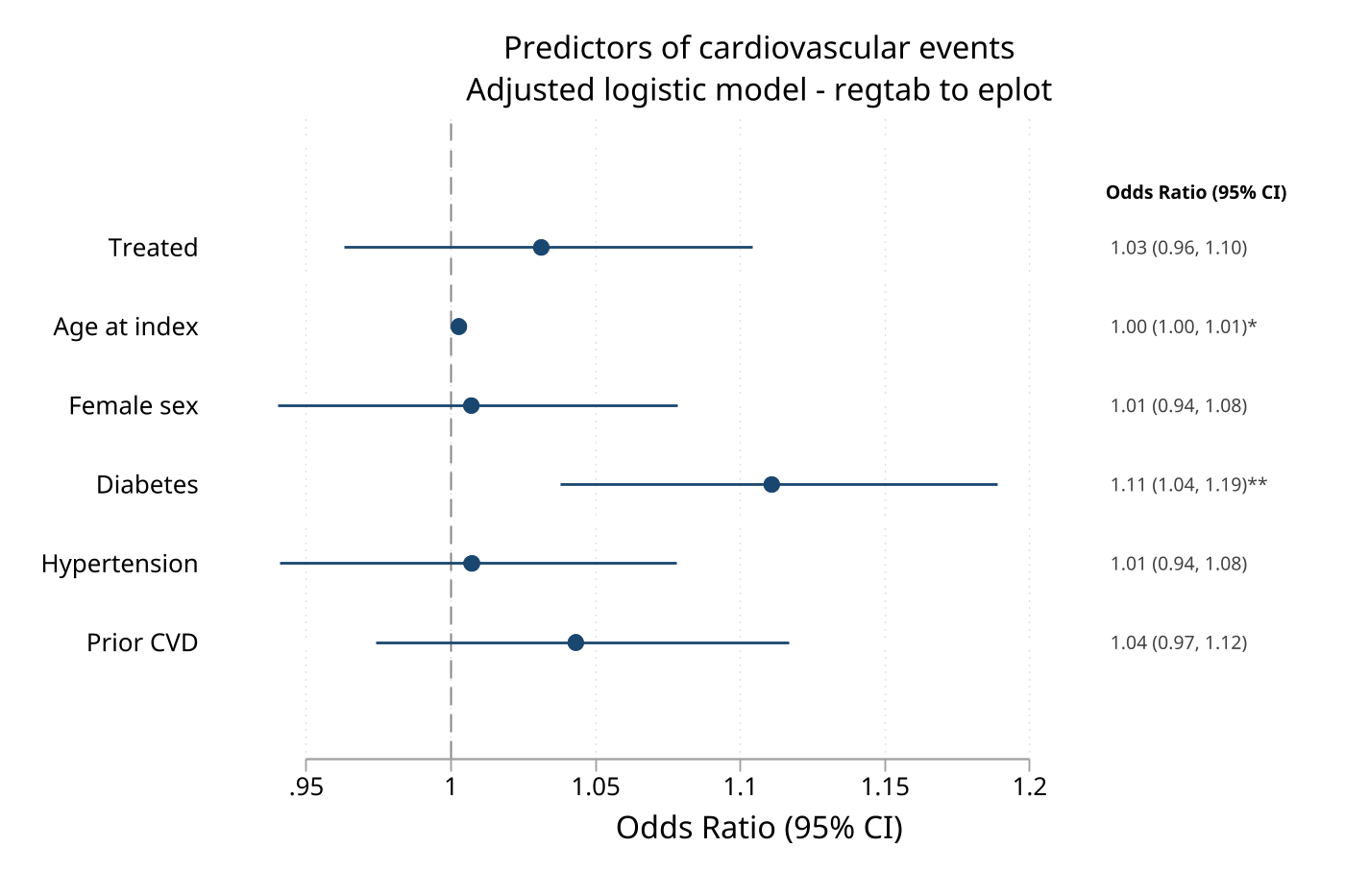
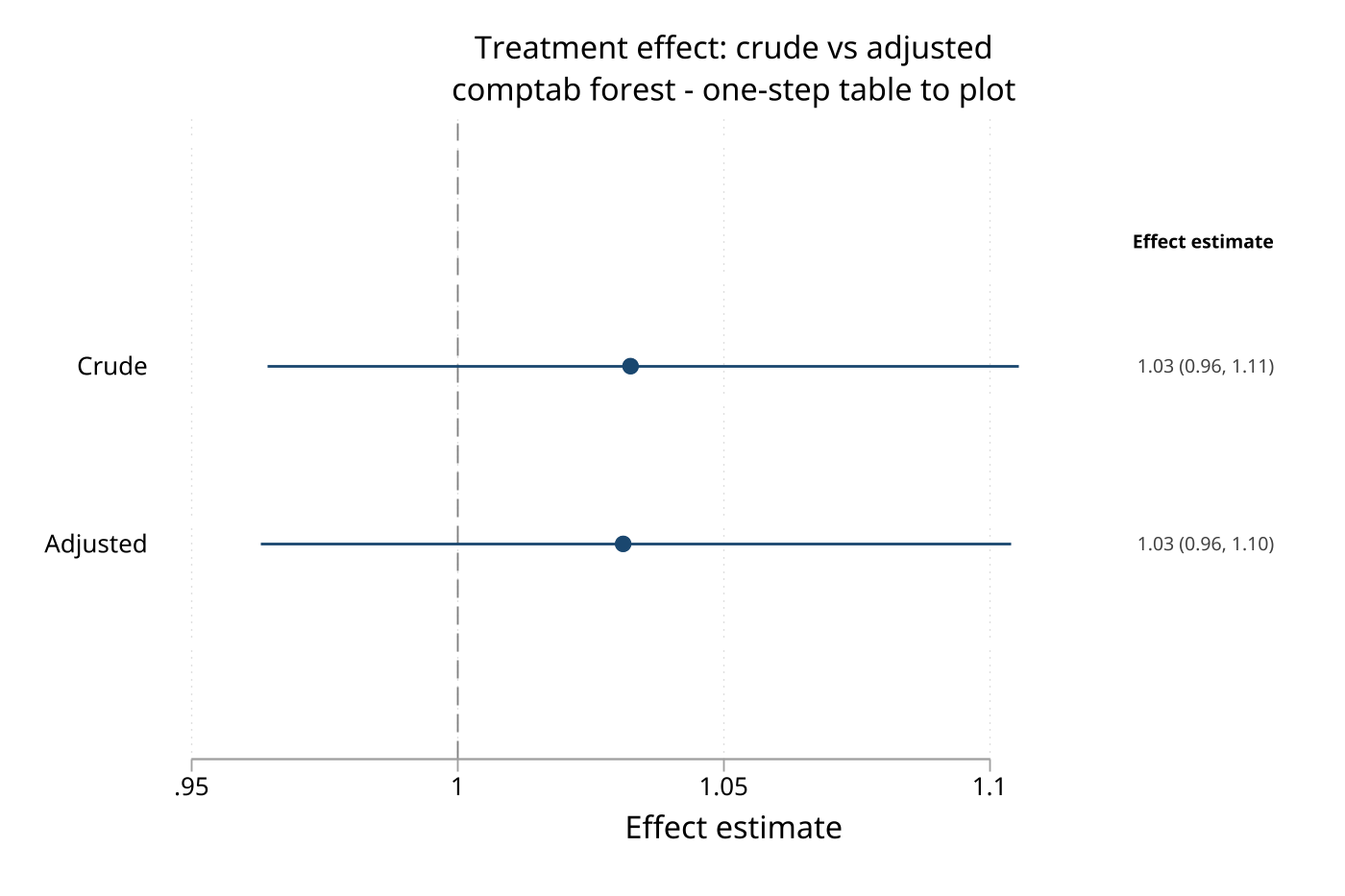
The optional forest-plot demo is demo/demo_tabtools_eplot.do. It regenerates the two checked-in graph assets below from regtab/comptab workflows and requires the optional eplot and tc_schemes packages in the checkout environment.
Command Reference
The command help files are the authoritative reference for abbreviations and complete option parsing. The syntax and defaults below summarize the public contracts.
table1_tc
table1_tc [varlist] [if] [in] [fweight], [by(varname) vars(string) format(string) percformat(string) nformat(string) iqrmiddle(string) sdleft(string) sdright(string) gsdleft(string) gsdright(string) percent missing pdp(#) highpdp(#) test statistic excel(string) xlsx(string) sheet(string) title(string) clear percent_n percsign(string) spacelowpercent extraspace slashN total(string) catrowperc varlabplus headerperc borderstyle(string) wt(varname) smd footnote(string) open boldp(#) zebra highlight(#) headershade frame(string) theme(string) smdthreshold(#) headercolor(string) zebracolor(string) csv(string) markdown(string) mdappend missingsummary smallcells(#) dots wtcompare wtn nopvalue]
table1_tc is Stata 16+ and accepts frequency weights. Without vars(), it infers row types from the varlist; the default display formats are %2.0f, %5.0f, and %12.0fc for common continuous, percentage, and count cells, with pdp(3), highpdp(2), and an SMD threshold of 0.1. The Excel sheet defaults to Table 1; smdthreshold(-1) disables SMD highlighting, and clear replaces the current dataset with the table. smallcells(#) requires an integer threshold of at least 3 and protects exact disclosure within one invocation; it does not certify anonymization or account for linkage across separate releases.
desctab
desctab, [xlsx(string) excel(string) sheet(string) title(string) footnote(string) compose(string) nformats(string) digits(#) pctdigits(#) nintegerfmt(string) pctscale(string) pctsign rowtotals coltotals nototals keep(string) drop(string) statorder(string) statlabels(string) nomissing zebra headershade headercolor(string) zebracolor(string) borderstyle(string) theme(string) open csv(string) markdown(string) mdappend frame(string) highlight(#) hlstat(string) smallcells(#)]
desctab is Stata 17+ and requires an active collect table from table. The sheet defaults to Descriptive, digits default to the session setting or 2, percentage digits default to 1, the integer format is %12.0fc, and hlstat() defaults to mean. smallcells(#) requires an integer of at least 3 and supports exact count/frequency layouts or named compose(n_pct) only; unsupported collect lineages fail closed. keep() and drop() are mutually exclusive; mdappend requires markdown().
crosstab
crosstab rowvar colvar [if] [in] [fweight=exp], [xlsx(string) excel(string) colpct rowpct totalpct or rr rd trend cochran exact fisher label missing level(#) digits(#) title(string) footnote(string) theme(string) borderstyle(string) headershade headercolor(string) zebracolor(string) boldp(#) zebra csv(string) markdown(string) mdappend frame(string) smallcells(#) open]
crosstab is Stata 17+, accepts numeric categorical variables and frequency weights, and defaults to column percentages, the current c(level), and session digits or 1. smallcells(#) requires an integer of at least 3 and protects counts, released margins, dependent percentages, tests, and requested measures before any sink runs. or, rr, and rd require a 2x2 table; trend and cochran are separate ordered-trend tests; exact and fisher are synonyms. Numeric level order, not value-label order, determines the requested 2x2 measures.
corrtab
corrtab varlist [if] [in], [xlsx(string) excel(string) spearman lower upper full star(numlist) pvalues digits(#) title(string) footnote(string) theme(string) borderstyle(string) headercolor(string) zebracolor(string) zebra headershade csv(string) markdown(string) mdappend frame(string) open]
corrtab is Stata 17+, requires at least two numeric variables, defaults to Pearson correlations, the lower triangle, and session digits or 2, and uses star cutoffs 0.001 0.01 0.05 when star() is requested. lower, upper, and full are mutually exclusive; pvalues cannot be combined with star().
regtab
regtab, [xlsx(string) excel(string) sheet(string) sep(string) models(string) coef(string) nointercept keepintercept noreffects stats(string) relabel(string) digits(#) footnote(string) open zebra headershade highlight(#) boldp(#) cdisc borderstyle(string) stars theme(string) starslevels(numlist) headercolor(string) zebracolor(string) csv(string) markdown(string) mdappend frame(string) eplotframe(name[, replace]) keep(string) drop(string) dimnonsig factorlabel refcat(string) cutlabels(string) addrow(string) compact nopvalue pdp(#) highpdp(#) labelwidth(#) level(#)]
regtab is Stata 17+ and renders the active collect result. The sheet defaults to Regression, digits to the session setting or 2, sep() to , , pdp(3), highpdp(2), refcat() to Reference, labelwidth() to 45, and starslevels() to 0.05 0.01 0.001. Ratio-scale models receive their conventional coefficient labels and suppress intercepts automatically where appropriate; keep() and drop() are mutually exclusive. stats() accepts n, aic, bic, qic, icc, ll, groups, and r2.
The command does not fit models and can alter the active collection's layout and styles. Explicit level() must agree with collection metadata; when Stata 19 has no collection level metadata, supply level() rather than relying on an implicit fallback. nopvalue hides p-value columns but does not remove p-values used by stars or highlighting.
effecttab
effecttab, [xlsx(string) excel(string) sheet(string) sep(string) type(string) effect(string) models(string) title(string) clean tlabels(string) footnote(string) open zebra headershade highlight(#) boldp(#) borderstyle(string) full theme(string) digits(#) headercolor(string) zebracolor(string) csv(string) markdown(string) mdappend frame(string) eplotframe(name[, replace]) from(name) addrow(string) pdp(#) highpdp(#) labelwidth(#) level(#) refcat(string)]
effecttab is Stata 17+ and accepts an active margins/teffects collection or a matrix through from(). The sheet defaults to Effects, digits to 2, sep() to , , pdp(3), highpdp(2), refcat() to Reference, and labelwidth() to 45; type() and effect() are inferred when omitted. Matrix input uses 95% intervals unless level() is supplied, and collection-level provenance rules match regtab.
survtab
survtab, times(numlist) [by(varname) rmst(#) median riskset timeunit(string) reverse difference events level(#) digits(#) xlsx(string) excel(string) sheet(string) title(string) footnote(string) theme(string) borderstyle(string) headershade headercolor(string) boldp(#) zebra zebracolor(string) highlight(#) pdp(#) highpdp(#) csv(string) markdown(string) mdappend frame(string) open addrow(string)]
survtab is Stata 17+ and requires stset data. The default time unit is years, the sheet is Survival, the confidence level is c(level), digits are the session setting or 1, and pdp()/highpdp() default to 3/2. by() adds group columns; median, riskset, events, and rmst() add corresponding quantities; difference reports group 1 minus group 2 RMST when exactly two groups are supplied. reverse reports 1 − KM and is not a competing-risks estimator.
stratetab
stratetab, using(string) outcomes(integer) [xlsx(string) excel(string) sheet(string) title(string) outlabels(string) outcomeids(string) explabels(string) digits(#) eventdigits(#) pydigits(#) unitlabel(string) pyscale(#) ratescale(#) rateratio ratiodigits(#) footnote(string) open zebra borderstyle(string) theme(string) headershade headercolor(string) zebracolor(string) csv(string) markdown(string) mdappend frame(string) level(#)]
stratetab is Stata 17+ and reads .dta files produced by strate, output(). Pass the output() filename stem to using(); stratetab adds the .dta suffix automatically. outcomes() is required and must divide the number of input files; files are interpreted as all outcomes for exposure 1, then all outcomes for exposure 2, and so on. Defaults are sheet Results, digits(1), eventdigits(0), pydigits(0), unitlabel("1,000"), pyscale(1), ratescale(1000), and ratiodigits(2). Rate confidence-level metadata must be present and consistent, or be supplied explicitly with level().
hrcomptab
hrcomptab rateframe, modelframes(framelist) rows(string) [rownames(string) outcomemap(string) xlsx(string) excel(string) sheet(string) csv(string) markdown(string) mdappend frame(string) eplotframe(name[, replace]) forest eplotoptions(string) open title(string) footnote(string) effect(string) reflabel(string) theme(string) borderstyle(string) zebra headershade headercolor(string) zebracolor(string)]
hrcomptab is Stata 17+ and requires a rate frame from stratetab, frame() plus model frames from regtab or effecttab. Supply exactly one of rows() or rownames() with compatible row identifiers. The sheet defaults to Composite, effect() to aHR, reflabel() to Reference, and the title to the source rate-frame title; forest and eplotframe() require eplot for plotting.
comptab
comptab framelist, rows(string) [rownames(string) xlsx(string) excel(string) sheet(string) title(string) footnote(string) compact separator(numlist) section(string) relabel(string) theme(string) borderstyle(string) open zebra headershade highlight(#) boldp(#) headercolor(string) zebracolor(string) csv(string) markdown(string) mdappend frame(string) eplotframe(name[, replace]) forest eplotoptions(string) labelwidth(#)]
comptab is Stata 17+ and combines compatible regtab/effecttab source frames. Supply exactly one of rows() or rownames(); the sheet defaults to Composite and labelwidth() to 45. separator() controls section separation, section() and relabel() control displayed organization, and forest/eplotframe() require eplot.
diagtab
diagtab test_var gold_var [if] [in], [xlsx(string) excel(string) cutoff(#) cutoffs(numlist) prevalence(#) exact wilson auc optimal level(#) digits(#) title(string) footnote(string) theme(string) borderstyle(string) headercolor(string) zebracolor(string) zebra headershade csv(string) markdown(string) mdappend frame(string) open]
diagtab is Stata 17+ and requires numeric test and gold-standard variables. With no cutoff option, the test must already be binary; cutoff() accepts one threshold, cutoffs() accepts several, auc computes ROC AUC for a continuous test, and optimal selects the Youden-optimal cutoff. cutoff()/cutoffs() cannot be combined with auc or optimal; the default interval is Wilson, the confidence level is c(level), and digits are the session setting or 1. prevalence() adjusts PPV and NPV for a known prevalence.
puttab
puttab [varlist] [if] [in] [using filename.xlsx], [frame(string) matrix(name) sheet(string) title(string) footnote(string) theme(string) borderstyle(string) headercolor(string) zebracolor(string) zebra headershade digits(#) varlabels noheader csv(string) markdown(string) mdappend open]
puttab is Stata 17+ and accepts exactly one source: a current-data varlist, frame(), or matrix(). The default sheet is Table and digits default to the session setting or 2; using is required for Excel output, while Markdown-only output can omit it. varlabels uses variable labels and noheader suppresses the header row.
stacktab
stacktab using outbook.xlsx, blocks(blockspec) sheet(sheetname) [layout(string) title(string) note(string) footnote(string) columnmerge style(string) borders(string) spacing(#) csv(string) markdown(string) mdappend frame(string) display append sheetreplace]
stacktab is Stata 16+ and reads an existing .xlsx workbook. blocks() identifies the source ranges, sheet() identifies the output worksheet, and layout() defaults to vertical stacking; hstack places blocks horizontally. The default title cell is A1, the first table starts at B2, and spacing() defaults to 0. append and sheetreplace control an existing target sheet and cannot be used together.
simtab
simtab estimator [if] [in], estimate(varname) se(varname) [true(#|varname) by(varname) estimand(varname) sim(varname) coverage(varname) lci(varname) uci(varname) pvalue(varname) reject(varname) nsim(varname)]
simtab, from(simsum|siman|summary) [byvar(varname) estimatorvar(varname) estimandvar(varname) measures(string)]
Common output and formatting options are metrics() level(#) alpha(#) minreps(#) warnreps(#) order(data|sort) digits(#) pctdigits(#) sedigits(#) nosign xlsx() excel() sheet() title() footnote() frame() plotframe() csv() markdown() mdappend theme() borderstyle() headercolor() zebracolor() headershade zebra display open.
simtab is Stata 16+. Compute mode requires estimate() and se() and uses true() when bias or coverage metrics need a target; ingest mode requires from(), and from(summary) uses the supplied mapping options. Defaults are metrics mean bias empse meanse coverage n, level(95), alpha(.05), minreps(2), warnreps(100), data order, digits 2, sedigits() equal to digits(), pctdigits(0), and sheet Simulation. At least one of xlsx(), csv(), markdown(), frame(), plotframe(), or display must be requested.
tabtools
tabtools [, list detail category(string) font(string) fontsize(#) headercolor(string) zebracolor(string) borderstyle(string) permanent profile(string)]
tabtools set key value [, permanent profile(string)]
tabtools set clear [, permanent profile(string)]
tabtools get
tabtools use [using filename] [, profile(string)]
tabtools is Stata 16+. list displays the command catalog, detail adds descriptions, and category() filters descriptive, models, rates, survival, diagnostics, composite, export, simulation, general, or all. set keys are font, fontsize, borderstyle, theme, digits, and boldp; fontsize() accepts 6–72 points, digits accept 0–6, and border styles are default, thin, medium, and academic. permanent writes a runnable profile in the Stata PERSONAL directory, and profile() selects an alternate profile path; use loads a profile for the session.
tabtools_tips
tabtools_tips [, open]
tabtools_tips is Stata 16+ and prints a compact recipe reference; open opens its help file. It has no stored results.
Key Options
Output targets
xlsx(filename)writes an Excel workbook;excel(filename)is a compatibility synonym where listed in command syntax.sheet(name)selects the Excel sheet. Defaults areTable 1,Descriptive,Crosstab,Correlation,Regression,Effects,Survival,Results,Composite,Table, andSimulationfor the corresponding commands.csv(filename)writes the visible table data for commands that support CSV output. Titles and footnotes are not additional CSV columns.markdown(filename)writes GitHub-Flavored Markdown. Usemdappendonly with an existing Markdown target.frame(name[, replace])stores the rendered table;eplotframe(name[, replace])stores graph-ready model/effect results;plotframe(name[, replace])is the numeric simulation companion.openrequires an Excel target and asks Stata to open the written workbook.
Formatting
theme(name)acceptslancet,nejm,bmj,apa,jama,plos,nature,cell,annals, orcustom.borderstyle()acceptsdefault,thin,medium, oracademic; a fresh session's baseline is thin.headershade,headercolor(),zebra, andzebracolor()control header and alternating-row appearance.title()andfootnote()add report text; command-specificnote()orsection()options are documented with the commands that support them.boldp(#)andhighlight(#)emphasize statistically notable cells where supported;nopvaluehides p-value columns inregtabwithout discarding p-values used for styling.
Selection and precision
digits()controls decimal display where available; command defaults are listed in the command reference, andtabtools set digitsprovides the session default.pdp()andhighpdp()control ordinary and small p-value display in commands that show p-values.keep()anddrop()are mutually exclusive in commands that offer both;models(),coef(),relabel(),cutlabels(), andaddrow()provide command-specific selection or annotation.level()controls confidence intervals only where the command accepts it. Collection and saved-rate commands reject conflicting or unavailable confidence-level metadata.
Suite controller, custom-theme, and profile options
| Option | Applies to | Purpose |
|---|---|---|
list |
tabtools display mode |
Show the public command catalog as a simple list |
detail |
tabtools display mode |
Add command descriptions to the catalog |
category(string) |
tabtools display mode |
Filter the catalog by descriptive, models, rates, survival, diagnostics, composite, export, simulation, general, or all |
font(string) |
tabtools set theme custom |
Set the custom theme's font family |
fontsize(#) |
tabtools set theme custom |
Set the custom theme's font size in points; valid values are 6–72 |
permanent |
tabtools set and tabtools set clear |
Save the resulting defaults to a runnable profile on disk |
profile(filename) |
tabtools set ..., permanent and tabtools use |
Choose an alternate profile file instead of the default tabtools_profile.do in Stata's PERSONAL directory |
The custom-theme form also accepts headercolor(), zebracolor(), and borderstyle(). Use these builder-style options with tabtools set theme custom; named themes can be selected directly with tabtools set theme.
Stored Results
All result-producing commands return output paths and dimensions when the corresponding target is requested. Names below are r() results unless noted otherwise; dynamic names use # for a model, group, outcome, or estimator index.
table1_tc
Returns r(markdown_rows), r(markdown_cols), r(Dapa), r(methods), r(varlist), r(xlsx), r(sheet), r(frame), r(markdown), and r(table). With smallcells(#), it also returns r(smallcells), r(N_primary_suppressed), r(N_secondary_suppressed), r(N_derived_suppressed), and the code matrix r(suppression); protected p-values and SMDs in r(table) are .d.
desctab
Returns r(N_cells), r(N_rows), r(markdown_rows), r(markdown_cols), r(version), r(rowvar), r(colvar), r(stats), r(compose), r(xlsx), r(sheet), r(frame), r(markdown), r(methods), and r(table). With smallcells(#), it also returns r(smallcells), r(N_primary_suppressed), r(N_secondary_suppressed), r(N_derived_suppressed), and r(suppression); protected numeric cells use .p, .s, and .d.
crosstab
Returns r(N), r(ci_level), r(chi2), r(p), requested r(or), r(rr), or r(rd), trend results r(p_trend), r(chi2_trend), and r(z_trend) where applicable, plus r(markdown_rows), r(markdown_cols), r(table), r(methods), r(trend_method), r(xlsx), r(sheet), r(frame), and r(markdown). With smallcells(#), it also returns r(smallcells), suppression counts, and r(suppression); protected counts use .p/.s and dependent inferential results use .d.
corrtab
Returns correlation, p-value, and pair-count matrices r(C), r(P), and r(N), plus r(markdown_rows), r(markdown_cols), r(xlsx), r(sheet), r(frame), r(markdown), and r(methods).
regtab
Returns r(N_rows), r(N_cols), r(N_models), r(ci_level), r(markdown_rows), r(markdown_cols), r(xlsx), r(sheet), r(markdown), r(coef_label), r(methods), r(stars), r(frame), r(eplotframe), and r(table). Model-specific statistics use dynamic names such as r(n_#), r(aic_#), r(bic_#), r(qic_#), r(icc_#), r(ll_#), and r(groups_#) where available.
effecttab
Returns r(N_rows), r(N_cols), r(ci_level), r(markdown_rows), r(markdown_cols), r(xlsx), r(sheet), r(markdown), r(type), r(effect_label), r(methods), r(frame), r(eplotframe), and r(table).
survtab
Returns r(N_rows), r(table), r(ci_level), r(logrank_p), r(logrank_chi2), r(n_groups), r(markdown_rows), r(markdown_cols), r(by_var), r(xlsx), r(sheet), r(markdown), r(csv), r(methods), and r(frame). Group and time summaries use dynamic names such as r(median_#), r(events_#), r(atrisk_#), r(rmst_#), r(rmst_se_#), r(rmst_lb_#), r(rmst_ub_#), r(group_#_value), and r(group_#_label); two-group RMST differences use r(rmst_diff), r(rmst_diff_se), r(rmst_diff_lb), r(rmst_diff_ub), and r(rmst_diff_p).
stratetab
Returns r(N_rows), r(N_exposures), r(N_outcomes), r(ci_level), r(markdown_rows), r(markdown_cols), r(rates), r(ratios), r(xlsx), r(sheet), r(frame), r(outcome_ids), r(markdown), and r(methods).
hrcomptab
Returns r(N_rows), r(N_outcomes), r(N_sections), r(N_modelrows), r(N_modelframes), r(ci_level), r(markdown_rows), r(markdown_cols), r(rateframe), r(modelframes), r(effect), r(xlsx), r(sheet), r(markdown), r(csv), r(frame), and r(eplotframe).
comptab
Returns r(N_rows), r(N_cols), r(N_models), r(N_frames), r(ci_level), r(markdown_rows), r(markdown_cols), r(frame), r(markdown), r(xlsx), r(sheet), r(methods), and r(eplotframe).
diagtab
Returns the accuracy scalars r(TP), r(FP), r(FN), r(TN), r(ci_level), and the estimate, interval, and likelihood-ratio results named r(sensitivity), r(sensitivity_lb), r(sensitivity_ub), r(specificity), r(specificity_lb), r(specificity_ub), r(ppv), r(ppv_lb), r(ppv_ub), r(npv), r(npv_lb), r(npv_ub), r(accuracy), r(accuracy_lb), r(accuracy_ub), r(lr_pos), r(lr_pos_lb), r(lr_pos_ub), r(lr_neg), r(lr_neg_lb), r(lr_neg_ub), r(dor), r(dor_lb), r(dor_ub), and r(youden). AUC and optimal-cutoff results use r(auc), r(auc_lb), r(auc_ub), and r(optimal_cutoff) when requested; table output also returns r(markdown_rows), r(markdown_cols), r(cutoff_table), r(cutoffs), r(xlsx), r(sheet), r(frame), r(markdown), and r(methods).
puttab
Returns r(n_rows), r(n_cols), r(n_datarows), r(source), and, when applicable, r(sheet), r(file), r(csv), r(markdown), r(markdown_rows), and r(markdown_cols).
stacktab
Returns r(blocks_loaded), r(rows_written), r(rows_out), r(cols_out), r(append_start), r(layout), r(sheet), r(markdown), r(book), r(table_start), r(title_cell), r(frame), r(csv), and optional r(note_row), r(markdown_rows), and r(markdown_cols).
simtab
Returns r(mode), r(source), r(metrics), r(methods), r(n_estimands), r(n_estimators), r(n_by), r(N_cells), r(N_input), r(n_dropped_se), r(level), r(alpha), r(n_reps_min), r(n_reps_max), r(frame), r(plotframe), r(xlsx), r(sheet), r(csv), r(markdown), r(markdown_rows), and r(markdown_cols), with r(n_fail_max) when the input supplies failure counts.
tabtools
tabtools display mode returns r(commands), r(n_commands), r(version), and r(categories). set returns the changed setting, r(permanent), r(profile), and r(action) when clearing; get returns r(font), r(fontsize), r(borderstyle), r(theme), r(headercolor), r(zebracolor), r(digits), and r(boldp). use returns r(action) = "loaded" and r(profile).
Assumptions and Limits
- Stata version requirements are command-specific; installing the package on Stata 16 does not make the Stata 17 commands available.
regtab,effecttab, anddesctabformat existingcollectresults. Save or rebuild a collection if you need to preserve an unmodified layout or style after rendering.regtabandeffecttabrequire confidence-level metadata to agree with an explicitlevel();stratetabapplies the same rule to savedstratemetadata.table1_tcuses Stata frequency-weight syntax. Probability and importance weights are not silently treated as frequency weights; weighted tables use weighted percentages by default, andwtnrequests effective counts where supported.- Standardized mean differences require
table1_tc, by().wtcompareandwtnrequirewt(). crosstabeffect measures require a 2x2 table and can be undefined for zero cells. Ordered trend tests require the relevant binary or ordered variables.survtabrequiresstset;reverseis a complementary Kaplan–Meier display and does not model competing risks. RMST differences are defined for two groups.stratetabdepends on the exact file order emitted bystrate, output()and requiresoutcomes()to describe that order. Itsrateratiomatching uses exposure labels and treats the first exposure as the reference.diagtabdirect binomial intervals can be exact or Wilson; prevalence-adjusted PPV/NPV use a delta-method interval truncated to the unit interval.aucrequires both gold-standard classes.comptabandhrcomptabrequire compatible source-frame row identifiers. Forest output is an optional eplot integration, not a required table dependency.stacktabreads existing.xlsxworkbooks and uses Stata's Excel facilities; source blocks must identify valid worksheet ranges.simtabdrops or reports insufficient-replication and missing-standard-error cases according to its input andminreps()settings. Compute mode requires the requested source variables, while ingest mode requires the selected external format.tabtools set permanentwrites a runnable profile in the user's Stata PERSONAL directory. It changes future sessions only when that profile is loaded or sourced.- Excel output requires a writable target path, and
openadditionally requires a graphical Excel-capable environment. Markdown and CSV targets do not require Excel. smallcells(#)protects exact disclosure within one invocation oftable1_tc,desctab, orcrosstab. Its deterministic final pass makes the complementary set irredundant, not necessarily globally minimum. It does not certify anonymization or account for linkage across separate releases; an unsupported or unprovable layout fails before output.
References
- Morris TP, White IR, Crowther MJ. Using simulation studies to evaluate statistical methods.
simsumdocumentation and article: doi:10.1177/1536867X1001000305. simanis available from the UCL/siman repository.- Optional forest plots use the eplot package when installed.
QA
QA suites and how to run them are documented in qa/README.md.
Version History
- 1.14.2 (2026-08-11): Removed individually redundant
≥#complementary markers after exact-disclosure safety is certified, so each one remaining is necessary in the final protected table; added independent bounded irredundancy validation and public-command regressions fortable1_tc,desctab, andcrosstab. - 1.14.1 (2026-08-11): Made all 77 shipped Stata programs declare their class and independently restore
c(varabbrev)on success and error, and hardened cleanup around variable-type sampling, simulation-summary postfiles, and simulation plot-frame construction. - 1.14.0 (2026-08-11): Extended strict
smallcells(#)disclosure control tocrosstabcount blocks, margins, percentages, tests, and association/trend results, and to recognizeddesctabcount/frequency and namedn_pctcollect layouts, with fail-closed mapping, safe returns, frame provenance, and identical redaction across every sink. - 1.13.0 (2026-08-11): Added strict
table1_tc, smallcells(#)disclosure control with primary and complementary suppression, exact-reconstruction checks, dependent-statistic redaction, safe stored results, and identical markers across console, Excel, CSV, Markdown, frame, andclearoutput. - 1.12.2 (2026-08-10): Corrected continuous standardized mean differences for unweighted and frequency-weighted Table 1 summaries to use the documented root-mean of group variances rather than a degrees-of-freedom-weighted pooled standard deviation.
- 1.12.1 (2026-08-07): Stopped the CSV writer dropping a leading data row that is blank in every column, which silently cost
puttabandsimtabexports one observation relative to the workbook; the leading-row trim is now declared by the table-building commands that reserve that row rather than inferred from its contents. Repaired thecsv()option paragraph in fourteen help files, where the 1.12.0 wording left an SMCL directive open across a line break and printed{opt title()}literally in the Viewer. - 1.12.0 (2026-08-06): Corrected the return code
table1_tcanddesctabhand back to the caller, which was nonzero after every successful run; gave every CSV export the same shape as its workbook, sotitle()andfootnote()are written, the reserved all-empty first row is gone, and thecorrtabstar legend now reaches the CSV; madeputtabhonour the order of the variables it was given; escaped Markdown emphasis characters so a star legend survives export; routed thestacktabconsole preview through the shared display path, adding its title, note, and continuous rules; removed the stacked rules under everyregtabstatistic and added-row, and top-aligned whole rows rather than the label alone; gave the single-cutoffdiagtabtable its top and header rules; and aligned thetable1_tcmissing-data row's indent and percent format with the category rows it sits under. - 1.11.0 (2026-08-06): Corrected multi-model factor-level handling and Excel merging in
regtab, widened its confidence-limit field so large bounds no longer collapse to scientific notation, unified thetable1_tcheader descriptor across every sink, gaveregtab,effecttab, andtable1_tcreader-facing single-row Markdown headers, stopped Markdown headings being inferred from table data, appliedstacktab columnmerge()headers to every stacked block, carried generated star and coverage legends into every sink, normalized rate confidence-interval separators and formatted negative zero, corrected p-value phrasing and footnote punctuation, and quieted internal data-transformation messages. - 1.10.1 (2026-07-27): Refined confidence-level provenance, model statistics, coefficient and effect labels, diagnostic intervals, output contracts, and composite workflows.
- 1.10.0: Added stricter collection and saved-rate level handling, expanded regression statistics, and improved eplot-frame provenance.
- 1.9.11: Extended diagnostic confidence-level handling, p-value precision controls, and effect-table reference labels.
- 1.9.0: Added RMST summaries and differences, ordered crosstab tests, survival reverse-display notes, and broader table output options.
- 1.8.0: Expanded weighted Table 1 summaries, missingness reporting, SMD controls, and shared formatting defaults.
- 1.6.0: Added
simtabcompute and ingest workflows with frame and plot-frame output. - 1.5.0: Added eplot-ready frames and forest integrations for model and composite tables.
- 1.3.6: Added direct frame, matrix, workbook-block, CSV, and Markdown table workflows.
Author
Timothy P Copeland, Karolinska Institutet
License
MIT